In this article, we’ll walk through the key elements of VSCO Hub and how it can help you connect with brands that are looking for talented photographers.
You’ll learn what VSCO Hub is, how to make yourself more visible to brands, and how VSCO Hub can help you get discovered for photography jobs. As part of a VSCO Hub series, you can also explore How to Organize Your Photography Portfolio for Clients and How to be Prepared When Brands Find You.
Before my work at VSCO, I was a self-employed photographer, and I remember the acute pressure of managing a creative business and constantly seeking new opportunities. That’s why I’m genuinely excited about VSCO Hub – it’s more than just another tool. It’s a new way for photographers and creators to connect with brands, and potentially launch or grow your career.
What is VSCO Hub?
VSCO Hub is an easy-to-use directory of the best visual creators and photographers on VSCO. Since VSCO Hub is designed for businesses, you won’t have direct access to it as a Plus or Pro Member. If you have a business or want to see how it works, consider signing up for VSCO Hub separately.
Pro Members can choose to share their profiles on VSCO Hub, creating new opportunities to be seen by companies looking to hire amazing photographers – and that’s why we want to make sure you’re on board.
How VSCO Hub Works
When a brand logs into Hub, they can quickly search for photographers by genre and location – but the standout feature is the ability to search using a reference image. Hub uses a proprietary, AI visual search to match a reference image to creators who share a similar aesthetic. This means a business can find photographers based on their unique style.
All you have to do is focus on creating high-quality work and posting it on your profile, and VSCO Hub will do the rest to match you with the right opportunities.
Here’s a simple scenario: imagine a company sifting through social media for hours, trying to find the perfect photographer for their project. VSCO Hub simplifies this process, allowing them to discover you more efficiently. Brands will appreciate how streamlined their search becomes, and this significantly increases your chances of being hired.
The Role of the VSCO Community
What makes VSCO Hub work so effectively is the amazing talent of our community. However, Hub can only help you if your work is discoverable. This means publishing a solid body of images that showcases your personal style and experience. Brands need to recognize your unique vision and see how it aligns with their project.
To truly stand out on VSCO Hub, you’ll also need to think about how your photos fit in with the rest of your profile.
How to Show Up Well on VSCO Hub
Now that you understand what VSCO Hub is and how it works, let’s dive into how you can ensure that your profile stands out to brands looking to hire photographers like you.
Most of the steps we’ll cover can be done on desktop or the VSCO app. For this profile walkthrough, we recommend using a web browser on desktop so you can easily follow along.
Optimizing your profile for discoverability is key, so let’s start by heading over to vsco.co and navigating to your profile.
Step 1: Profile Basics
At the top right, you’ll find the option to edit your profile. Click on that, and then tap the face icon to begin editing your profile details. It’s important to keep in mind that when a business views your profile, they’re asking themselves key questions like:
- Who is this photographer?
- Where are they located?
- Can they create the work I need?
- Are they credible and professional?
Your goal is to make it easy for businesses to answer these questions confidently.
Here is an example of a professional photographer on VSCO, Ryan Belk.

When optimizing your VSCO Profile, keep these key things in mind.
- Ensure that the title of your profile is either your name or your business name. It should be crystal clear who you are when brands come across your profile on VSCO Hub.
- In your ‘About’ section, provide a simple, compelling overview of who you are and your experience.
- Here are some good examples:
- Commercial photographer in New York with 10 years of experience.
- Travel photographer with experience in over 30 countries and counting.
- Product photographer – willing to travel for shoots.
- Include key clients you’ve worked with to build instant credibility.
- If you have a personal website, link to it here so brands can find even more information about your portfolio and services.
- You can also link your social media accounts if you’d like to provide more insight into your work.
- Here are some good examples:
Be sure to add your location – this is where you’re actually based, not necessarily where you’re willing to travel. Many brands will be looking for photographers in specific locations, so it’s important that this information is accurate.
Step 2: Getting Ready for Hub
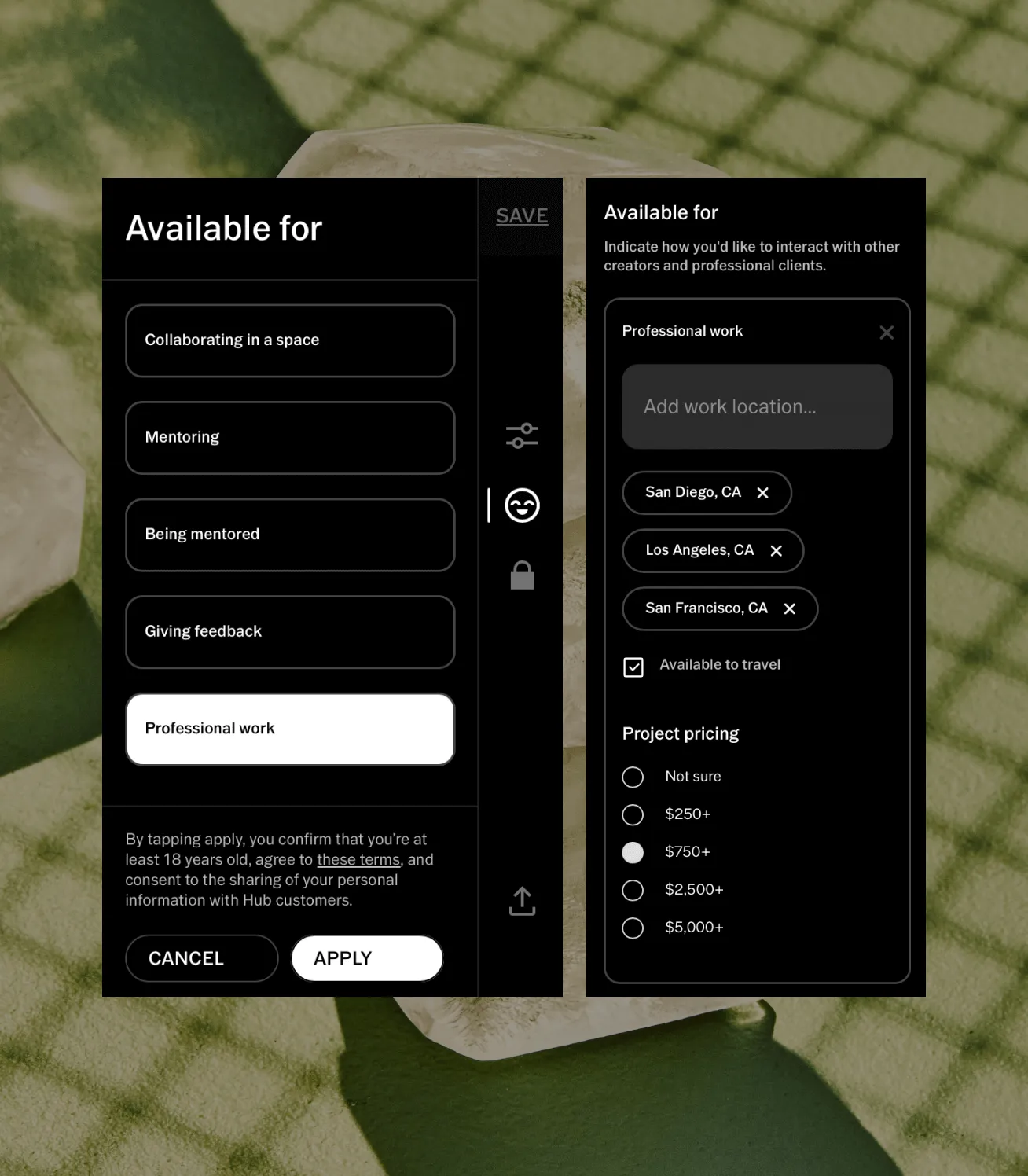
To make your profile visible on VSCO Hub, you’ll need to ensure that the ‘Professional work’ option is selected under the ‘Available for’ section when you’re updating your profile.
You’ve likely already done this, but it’s important to double-check and ensure the rest of your profile is complete.
- Ensure that your contact information is up to date. This should include your full name and an email address that you check regularly, as this is how brands may reach out to you.
- Next, input the location where you typically work and check the box for ‘available to travel’ if that applies to you.
- To help brands get a sense of whether you fit within their budget, include a general price range. Don’t worry—you’re not committing to any specific rates at this stage. This is just a helpful indicator for potential clients. If you haven’t set your own rate before, consider checking out this pricing guide for photographers.
- Select the types of work you’re confident in and willing to take on. For example, you can choose Studio, Portraits, Travel, Food, and Fashion. Make sure these selections accurately reflect your skills and interests.
After you’ve made all these updates, be sure to hit save at the top right of the profile to lock in your changes.
Step 3: How Your Profile Will Appear in Hub
Now, let’s take a look at how all of these elements come together on a real profile.
For this example, we’ll use Ivana Cajina’s profile on VSCO Hub. If I were a brand searching for a portrait photographer and I came across Ivana’s profile, I would want to see specific examples of her portrait work.
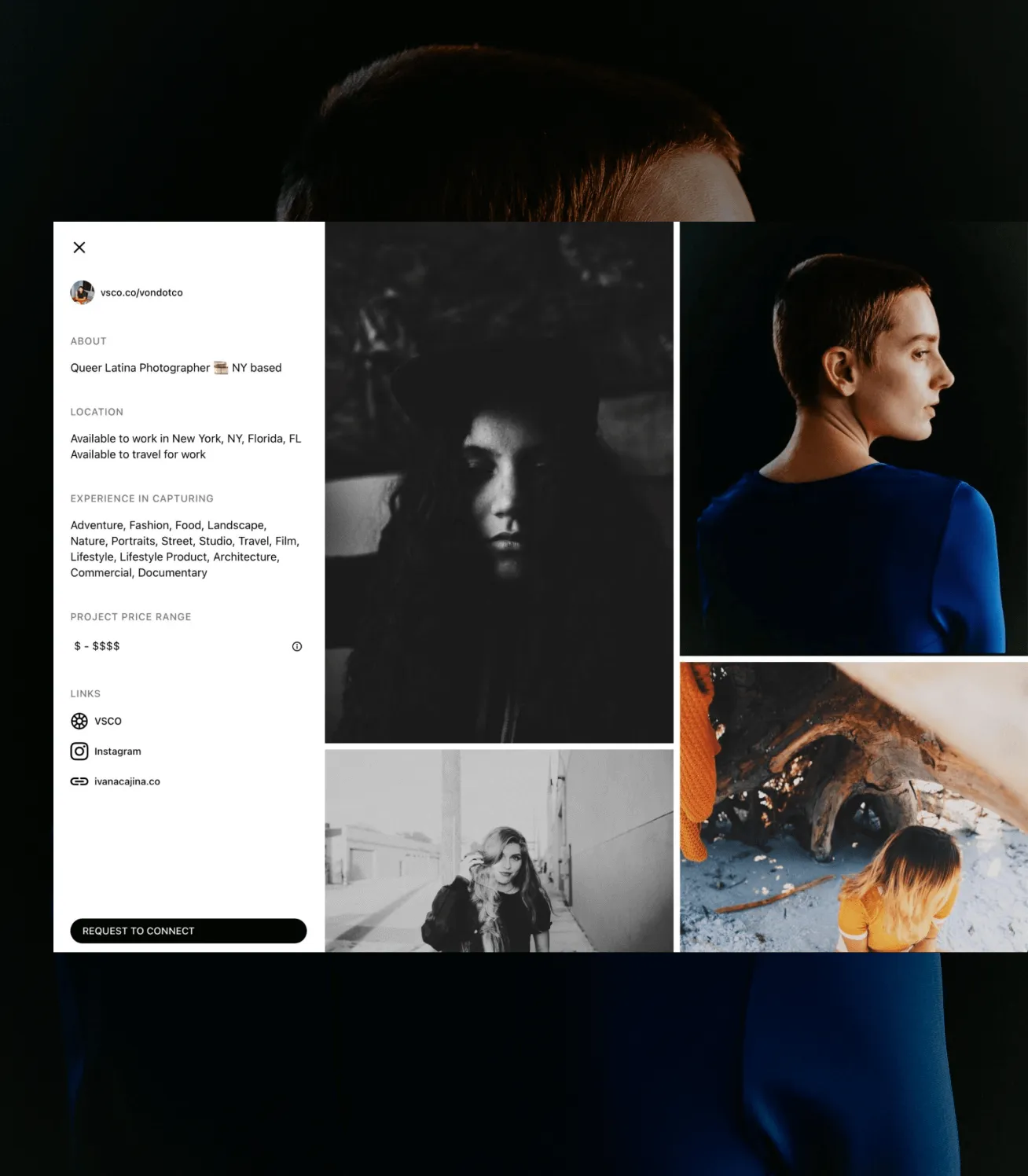
It’s crucial that your work demonstrates the skills and experience areas you’ve chosen to list on your profile. Brands always want to see examples, so you’ll want to make sure that your portfolio accurately reflects the kinds of projects you want to take on.
Create Photo Albums to Organize Your Work
Your profile should make it easy for potential clients to see the photos that best represent your work, and leveraging photo albums is one of the best ways to do this.
Organizing your photos helps you present your portfolio in a curated and organized manner, standing out in a competitive landscape. Consider making dedicated albums for your professional and personal projects, or highlight your experience in a specific genre, like portraiture or fashion.
Learn How to Organize Your Photography Portfolio for Clients on VSCO Hub.
Resources for Photographers
In addition to everything covered here, check out these other guides and resources from our team that can help you prepare for working with clients:
- How to Set the Value of Your Photography Work
- Photography Contracts Guide
- Creating Photo Albums
- Working with Brands through VSCO Hub

Optimize Your Profile for VSCO Hub
Increase your chances of getting noticed by clients searching on VSCO Hub by filling out your profile information and adding relevant photography work. A thoughtful profile conveys professionalism and readiness for new opportunities, making it easy for potential clients to understand your skills and feel confident in hiring you for their projects.
Sign in to your VSCO account to get started.
Once you’ve updated your VSCO Profile, check out the rest of the VSCO Hub series for more information on creating albums to organize your photography portfolio for clients and working with brands through VSCO Hub.