Family photography is beautifully unpredictable. Kids run through the frame, pets wander in and out, and real life shows up whether you planned it or not. That energy is what makes family photos feel alive. But it can also introduce distractions that pull attention away from what matters most: the people and the moment.
Thoughtful object removal isn't about chasing perfection. It's about editing with intention and cleaning up unplanned clutter so your subjects remain the story, not the things around them.
This guide breaks down how to decide when to remove objects, how to do it cleanly, and why AI object removal tools can help you deliver polished, timeless photographs without overrewriting the story.
In this guide:
- Why remove objects from photos?
- When not to remove objects
- How to spot distractions
- AI removal tools
- The cases for object remover
- Using object removal for better family photos
- Ethical removal
- Frequently asked questions
Removing an object isn't about “fixing” an image, it’s about shaping the viewer’s attention. Unwanted elements can pull focus away from faces and expressions, break the visual flow of the frame, distract from moments that should feel intimate or cohesive, and even date a photo with bright colors or recognizable clutter.
Simple edits like erasing a distracting sign, a stray bench, or a bold toy left in the corner can make a frame feel intentional, balanced, and ready for print.
Object removal also supports stronger visual flow. Bright or patterned objects can redirect the viewer’s eye, clutter becomes more noticeable in large prints, and cleaner frames create a more unified story when designing albums. Removing distractions isn’t about erasing reality; it’s about highlighting the heart of the photograph.
Honest photography has texture. Sometimes that includes things that are a little messy.
Before you erase anything, ask:
- Does this detail belong to the family’s story?
- Will removing it change the memory?
- Does it add charm, humor, or identity to the moment?
A well-dressed stuffed animal, chalk on a sidewalk, a string peeking from behind a tree—these aren't distractions. They're details the family might treasure in 10 years. Editing with empathy and openness toward emotion always leads to better work.

Over time, your eye will naturally train itself to scan a frame for obvious, and not-so-obvious, distractions. Try these quick tests to strengthen your intuition and formalize the process.
1. Squint test
Squint until the details blur. Whatever still jumps out is likely a distraction.
2. Horizontal flip
Flipping the image helps you see it as a new viewer would: fresh, unbiased, honest.
3. Desaturate temporarily
Most distractions come from color. Dropping saturation reveals hotspots instantly.
4. Scan the edges
Objects creeping in from corners often go unnoticed while shooting.
5. Ask a second set of eyes
Fresh perspective from an assistant or trusted peer can lead to better editing decisions.
Performing these simple checks helps you identify what's truly taking away from this moment, and what's worth keeping.
Object removal doesn’t need to be complicated. You don’t need a multi-window editing setup or a full retouching workflow.
For most photographers, the most efficient approach comes from using a tool that blends cleanly and respects the lighting and texture of the scene.
Object remover: precision when it matters
VSCO’s AI object remover is built for photographers who care about subtlety and detail, with advanced AI technology that merges both quality and ease of use.
Use the brush to target exactly what needs to go. Then refine it until it’s right.
- Blend seamlessly into textures like grass, sky, sand, fabric, and walls
- Preserve detail and avoids blur patches
- Respect skin tone integrity—crucial for portraits
- Work on mobile, so you can clean up images at the shoot, on the go, or in-between sessions.
This is control. The kind you need when the final image actually matters.

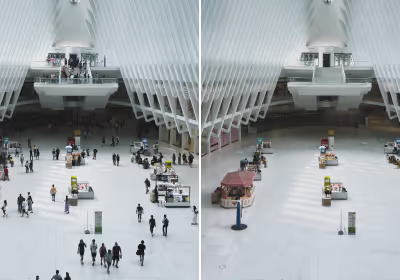
Some backgrounds are just too busy, with too many details to remove individually. A crowd pushing through the frame, a cluttered street corner, an event venue that won't cooperate. Simplify in AI Lab is a one-tap solution for exactly that: reducing background noise fast, so your subject gets the attention it deserves.
What used to mean patient masking and clone-stamping across layers now takes seconds. The result doesn't feel processed, and it looks like what you meant to capture in the first place.
When to use Simplify:
- Environmental portraits where you can't control what's behind your subject
- Street and travel photography in crowded markets, transit hubs, or tourist hotspots
- Event coverage in chaotic venues where a clean moment never quite cooperates
- Real estate and interior shots that need to feel open and uncluttered
Simplify works best when the composition is right but the background isn't. It's not about perfection, it's about removing the things pulling focus away from your vision without disrupting your editing flow.
Outdoor sessions
In outdoor sessions, object removal lets you clear distracting signage or playground equipment, sweep away stray objects that sneak into parks and beach frames, and clean up things like sand, footprints, or washed-up debris so the environment supports the moment instead of interrupting it.
Indoor sessions
For indoor sessions, an AI object remover helps you tidy background objects that weren’t part of the memory, remove small pieces of clutter that pull attention away from emotional connection, and clean up reflections or surface distractions so the space feels calm, intentional, and true to the mood of the scene.
Lifestyle and documentary sessions
In lifestyle and documentary work, you don’t need to sterilize the scene, just remove what doesn’t belong to the story. A single cleanup can elevate the image without touching its honesty. Small, intentional edits go a long way; sometimes one subtle removal can shift the entire flow of a photograph and make the moment feel even more effortless.
Family photographers carry a unique responsibility: you’re not only making images, you’re preserving memories.
A few principles help keep that responsibility grounded:
- Don’t remove people without permission.
- Avoid altering bodies, features, or permanent traits.
- Communicate clearly if you’re making major edits.
Your goal is to support the moment, not rewrite it.
Is it ethical to remove objects from family photos?
Yes, as long as you’re not altering the truth or feeling of the moment. Editing should enhance the story, not rewrite it. Always consider the family's expectations and emotional connection to the details.
Will clients notice or care if I remove things?
Most clients won’t notice unless the object was important to them. When in doubt or if they specifically ask, don’t hesitate to show both versions. It can actually be a fun way to involve them in the editing process.
Can I use Remove on group photos or busy backgrounds?
Yes, but with intention. Removing one or two items works well. For large areas or overlapping subjects you often run the risk of over-doing it or creating a noticeable memory gap. Advanced tools like VSCO’s Remove let you make larger edits with less noticeable effects on quality.
Should I tell clients what I edited out?
You don’t have to, unless the removal changes the memory significantly. Aim for a natural result that keeps the spirit of the moment intact.
How can I get faster at spotting distractions?
Practice. Review your photos regularly and note what you would remove or keep. Over time, you’ll train your eye to scan quickly.
What if my edits look obvious?
Zoom out and view the image at smaller sizes. If the patch stands out, feels blurry, or significantly changes the context or feeling of the moment, consider redoing it or just leaving the frame as it is.
Building object removal into your workflow
The most memorable family photos aren’t technically perfect. They’re emotionally resonant. Object removal is simply a tool to make sure the emotion comes through clearly. The best edits don’t announce themselves. They quietly support the story, letting light, connection, and personality shine.
If you want to elevate your editing workflow with clean, natural object removal, try VSCO Pro and start editing with Remove or Simplify in the VSCO app. These are subtle, powerful tools that help you deliver polished, timeless images without losing the authenticity families come to you for—and it lives right alongside dozens of other essential editing tools and effects.
Refine your next portrait session with VSCO Pro and see how small edits can transform your images and elevate your photography.