With so many platforms and constant updates, it can be overwhelming for any photographer looking to build their presence on social media. How do you make your work stand out in such a crowded space?
The key is to build a strong foundation for your social media presence – one that allows you to showcase your skills while still leaving plenty of time for what you love most: your photography.
Here are some actionable tips to help photographers get started on social media.
Why is Social Media Important for Photographers?
Social media is more than just a place to share your photos. It’s a powerful tool for growing your photography business and building your brand. Here’s why it’s worth investing your time and effort:
- Gain exposure: Social media gets more eyes on your work, helping you reach potential clients and collaborators far beyond just your local area.
- Build trust and credibility: A well-curated profile showcasing your best work, testimonials or tagged posts from past clients, and links to your photography site or online portfolio, can help establish you as a trusted professional.
- Network effectively: Social platforms are hubs for connection, opening doors to industry collaborations, new opportunities, and other professionals that can build your photography career.
- Inspiration and learning: By following other photographers and creative accounts, you can stay inspired and learn new techniques, trends, and ideas. Great photography is never made in a vacuum – always seek out inspiration and connect with other creators that can propel your photography in new directions.
Define Your Goals
Before diving into social media, you should determine what you want to achieve. Are you looking to attract clients, sell prints, network with industry professionals, or simply share your passion for photography?
Your goals will influence the platforms you choose, the type of content you post, and how you interact with your audience. For example:
- Portfolio showcase: Focus on platforms like VSCO, Instagram, and Behance.
- Client acquisition: Leverage VSCO Hub, Facebook, Instagram, and LinkedIn to attract inquiries.
- Networking: Use LinkedIn and Twitter to connect with industry peers, and platforms like VSCO, Threads, and Instagram for connecting with other photographers and creators.
- Education: Create tutorials on YouTube, Instagram, TikTok to share your expertise, or use Blogs to publish articles, stories, and more.
Choose the Right Platforms
Not all social media platforms are created equal, and each serves a unique purpose. Here’s a breakdown of the most popular platforms for photographers:
VSCO
VSCO is a photo editing and community-driven sharing platform that emphasizes creativity while also featuring high-quality tools, film-like presets, and innovative ways to connect and expand your network. It’s an excellent space for photographers who want to showcase their work, free from the noise of traditional social media. VSCO fosters a strong sense of community, making it ideal for connecting with like-minded photographers, discovering new inspiration, and collaborating on projects. It’s a great place for photographers to build their portfolios and attract potential clients who appreciate their unique vision.
Massive social media community that includes all kinds of creators, as well as many more personal accounts. It can be harder to stand out in the crowd, but those that do often have large network effects.
Threads
Good for those who want to share more text-based posts and engage in longer conversations without the pressure of a polished Instagram feed.
More focused on connecting with local communities, joining photography groups, and running targeted ads.
Can be useful for driving traffic to your website or blog, often with a more concentrated focus on genres like wedding, travel, and lifestyle photography.
YouTube
Popular for long-form video content like tutorials, behind-the-scenes footage, and vlogs.
TikTok
Almost exclusively for very short, engaging videos. Ideal for reaching younger audiences.
Useful for professional networking and showcasing industry expertise.
Effective for sharing updates, engaging in conversations, and staying current with industry trends.
Focus on the 1-3 platforms that best align with your goals and where your target audience spends the most time, especially if you just started your own photography business. Over time, as you find success, you can scale and optimize your social media accounts.
Social Media Tips for Photographers
Optimize your profile
Your profile is often the first impression you make. Optimize it to highlight your skills, niche, and availability:
- Profile name: Add relevant keywords to your name. For example, instead of just “Kelly Anderson,” try “Kelly Anderson | LA Wedding Photographer.”
- Bio: Include essential details like your location (e.g., “Based in Los Angeles, CA”), niche (“Wedding & Elopement Photographer”), and availability (“Booking weddings for 2025-2026”).
- Link in bio: Use links to drive traffic to your primary portfolio site, where potential clients can explore your work further and contact you for more information.
- Email contact: Email is a primary channel for contact and communications for most clients, so ensure your email address is visible and up to date for inquiries.
Showcase Your Best Work
Most social media feeds should serve as a curated collection of your best work. Avoid the temptation to post every photo you take. Instead, focus on quality over quantity.
If you want to share a broad range of work with less worry about showing your best photos, post to your VSCO feed for a pressure-free environment – you can always curate specific photos later in albums or on your site.
Here are some tips for sharing photography on social media:
- Edit photos for social media: Maintain consistent editing techniques to create a unified look. Use VSCO to create photo editing Recipes that make it easy to create unique, yet consistent looks across your accounts.
- Variety: Don’t be afraid to experiment with different types of shots and genres (e.g., portraits, landscapes, details) to keep your feed interesting. Over time, see if you can identify particular styles or genres that resonate more with your unique audience.
- Frequency: Post regularly, but don’t sacrifice quality for the sake of quantity. A good starting point for photographers is posting 3-5 times per week on social media. Avoid putting too much pressure on yourself to stick to an exact schedule, especially if you’re balancing other aspects of your photography business – burnout is real and it’s okay if you miss a day.
Engage with your community
Social media isn’t just about broadcasting your work – it’s about building relationships. Like posts, leave thoughtful comments, and follow other creators to help build your network.
Building a loyal community requires more than just posting great content. Engagement is often just as important. Take the time to interact with your followers with these tips:
- Like, comment, and follow: Engage with other photographers and potential clients by liking and commenting on their posts and staying up to date on their most recent activity.
- Respond to comments: Acknowledge and reply to comments and Discussions on your posts.
- Direct messages: Promptly respond to authentic inquiries and messages. Also, if you think there’s a strong connection to be made, don’t hesitate to send a message yourself–you never know when a simple conversation may lead to a new collaboration or potential client.
- Polls and Q&As: Use interactive tools like Instagram polls or question stickers to encourage audience participation and gain insights from your community.
Overall, engagement signals to social media platforms that your content is valuable, often further increasing its visibility. If you’re posting a lot of content without much traction, try leaning into engagement for a more balanced approach.
Prioritize authenticity
While aesthetics and strategy are important, authenticity is what truly connects people and builds an audience. Be genuine in your captions and words, share your journey, and don’t be afraid to show vulnerability. For example:
- Share the story behind your favorite photo.
- Talk about challenges you’ve faced as a photographer.
- Celebrate wins and milestones with your audience.
Use SEO keywords
Optimize your captions, descriptions, and alt text with relevant SEO keywords to improve discoverability. For example, if you’re posting a portrait session, include terms like “portrait photography” or “Los Angeles portraits.”
Add hashtags
Incorporate relevant hashtags to improve the reach of your posts. Choose specific tags that describe your work (e.g., #WeddingPhotography) over generic ones (e.g., #PhotoOfTheDay).
On platforms like Threads, where only one hashtag is allowed per post, use community-focused tags like #PhotographersOfThreads. Trending hashtags change frequently, so stay in touch with your community to keep up.
Trending audio
Using trending music or sounds on platforms like Instagram Reels, TikTok, and YouTube Shorts can boost your visibility. Trending audio often gets extra traction, helping your content reach a wider audience. Tailor your content to complement the underlying message, trend, or theme.
Batch and schedule your posts
Save time by batching your content creation and scheduling posts in advance. This ensures consistency and keeps your profile active without requiring daily effort.
Tips for Photographers on VSCO
VSCO is home for all photographers, and a whole lot more than the photo editing tools and effects you may know us for. With Pro Membership, you have access to a full suite of tools, community, and exposure – all made for photographers.
Show your style and connect with photographers on VSCO
Your VSCO profile is the perfect place to showcase your unique style and start growing your network. Post photos that stay true to your personal vision, and see how they stand out by visiting your Feed. From there, you can follow other inspiring photographers, as well as favorite and repost photos so you can show your support and revisit the images that fuel your creativity.
VSCO isn’t just about photos, though, we also support video–whether you’re editing with our full-suite of presets, posting behind-the-scenes looks at your process, or capturing cinematic scenes that catch your eye. Combining both photos and videos on your profile can create a dynamic look and feel that can further highlight your creativity.
If you’re just getting started, try posting with hashtags like #VSCO or head to our Blogs page to see this month’s prompt and other opportunities to get curated and licensed by the VSCO team.
Build a better portfolio website with VSCO Sites
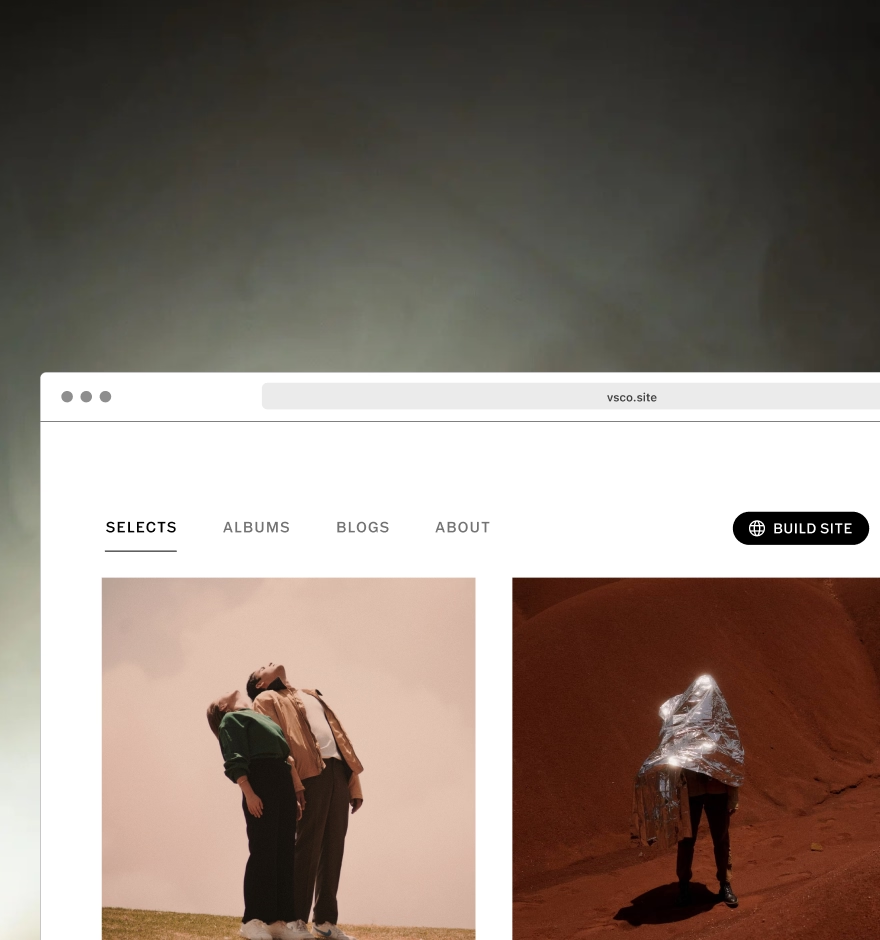
A good social media strategy will often focus on driving visitors to your primary photography or portfolio website. With VSCO Sites, you can build a website in seconds using the same posts, albums, and blogs from your profile. Easily curate your best work and update your portfolio, all with VSCO.
Share stories with Blogs
Social media is really about connection, and few things create connections better than a good story. Use Blogs to share behind-the-scenes takes, shine light on your creative process, and express your unique creativity. With Blogs on VSCO, you can combine and customize text, photos, and videos into one post that you can publish to your feed, profile, and site.
Get clients on VSCO Hub
Pro Members can choose to get listed on VSCO Hub, where clients search to hire the best photographers on VSCO – all you have to do is post your best work and make sure your profile is discoverable. Just update your availability on your profile to indicate that you’re open to “Professional Work.”
Learn more about VSCO Hub and how to increase your visibility to clients looking to hire for photography and creative jobs.
Instagram Tips for Photographers
Collab posts
Collaborate with other creators and photographers by co-authoring Instagram posts. When you tag collaborators, their followers also see your work, extending your reach. Consider a consistent series of posts with a common theme that can allow you to welcome many different collaborators.
Feed posts
Carousels – or posts with multiple images or videos – perform better than single-image posts on Instagram. Include up to 20 images or videos in a post and pair it with music to increase its visibility.
Reels
Reels are a great way to showcase your photography in a dynamic format. Even if you don’t shoot videos, you can create Reels by compiling photos into a slideshow. Use Instagram’s built-in text tools and trending sounds to further improve discoverability.
You can also edit videos using the VSCO video editor or montage maker to create one-of-a-kind Reels for Instagram.
Story highlights
Save your Instagram Stories as highlights on your profile to share behind-the-scenes glimpses of your work. Use interactive features like poll stickers to engage with your audience and link stickers to direct them to your photography portfolio website.
How to edit photos for Instagram
You want your photos to look their best when posting on social media. With VSCO’s photo editing app you can create a professional look with customizable tools and effects. Edit with a complete library of presets that can recreate vintage looks in a single tap, and save Recipes that capture your unique style–then post directly to Instagram using VSCO’s ‘Share-to’ feature.
Threads and X (formerly Twitter) Tips for Photographers
Trending Topics and Tags
Keep an eye on the “Trending” sections to join relevant conversations. For example, if the solar eclipse is trending, you could share your work on moon or night photography. You can also contribute to established photography-related tags, such as Photographers of Threads.
Pin a Post to your profile
If you have a Threads post you want to highlight—whether it's a high-performing favorite or it highlights an important aspect of your work—you can pin it to the top of your page. Just navigate to the post, tap the three dots, and select "Pin to Profile" to keep it front and center.
TikTok Tips for Photographers
Photo Mode
While TikTok is video-first, it also offers a “Photo Mode” for slideshows or carousels of images–ideal for sharing more cohesive sets of images.
In-App Text
Adding text to your videos with the TikTok app can improve searchability and reach.
YouTube Tips for Photographers
Long-Form Videos
Use YouTube to dive deeper into your craft. Share educational content, your personal journey as a photographer, or behind-the-scenes footage from shoots. These videos can help build stronger connections with your audience.
Shorts
Repurpose content from Instagram Reels or TikTok for YouTube Shorts to maximize your reach across platforms.
Pinterest Tips for Photographers
Create Boards
Pinterest is like a visual search engine. Create boards to categorize your work (e.g., “Wedding Photography,” “Portraits”) and attract users searching for inspiration.
Destination Links
Always include links to your portfolio or website in your pins to drive traffic and convert views into bookings.
Using Social Media for Photography
Social media is a powerful tool for growing your photography business in today’s digital world. By focusing on a few key platforms, optimizing your profiles, and using strategies like SEO keywords, hashtags, and trending audio, you can stand out in a crowded space.
Most importantly, don’t let social media distract you from the art of photography. Stay true to your unique perspective and let your passion shine through—because that’s what truly sets you apart as a photographer.