
A Google Doc invoice does one thing well: it creates a document.
Once it's sent as a PDF, you can't see whether it was opened, and it isn't built to send reminders when the due date passes or to tie invoices, contracts, and payments together, like the contract the client signed and the deposit they paid three months ago.
And if you're juggling four unpaid invoices across four different email threads, none of that gets easier.
When you're sending your first few invoices, none of that matters much. A tidy document and a Venmo request will get the job done.
But the moment you're managing multiple projects (retainers, balance payments, travel expenses, add-ons, clients who need follow-up), a document stops being a billing system and becomes just another file to track.
This article covers where a document-based invoicing process starts to fall short, what a dedicated photography billing workflow can do, and how connecting your invoicing to the rest of your client workflow changes the experience for you and for the people you work with.
What you'll learn in this guide:
- What a Document Template Can’t Do
- What a Photography Billing Workflow Requires
- The Real Cost of a Manual Invoicing Process
- What To Look For in Photography Invoicing Software
- Connect Invoicing To Your Full Client Workflow
- Signs It's Time To Move On
- How To Make The Switch
- Frequently Asked Questions
A well-designed invoice template in Google Docs can look completely professional. Google Docs also makes it easy to create, customize, and collaborate on invoices without purchasing dedicated software.
What creates the friction is everything that happens after you export the PDF and hit send.
A document is passive.
On its own, it doesn't track payment status, send automated reminders, or connect invoices to the rest of your billing workflow.
Every piece of information management falls on you: whether the invoice was received, whether the payment came in, whether you need to follow up, whether the amount reflects all the work that ended up being added to the project.
For a photographer managing multiple clients at once, that manual overhead compounds quickly.
Invoicing example for wedding photographers
Take a wedding booking. The billing process might include a non-refundable retainer at signing, a balance payment 30 days before the date, a separate invoice for a second photographer, travel expenses billed after the event, and a final invoice for album design.
With a document-based process, each of those can mean its own document, its own email, and its own payment to track.
The wedding itself is one job. The billing is five separate manual processes.
A word processor was designed to create documents, not manage billing workflows. The same applies to document and design templates in tools like Microsoft Word, Canva, and Apple Pages, which aren't dedicated invoicing systems.
Trying to use it as both means you're doing the workflow management yourself, in your head or in a spreadsheet, every time.
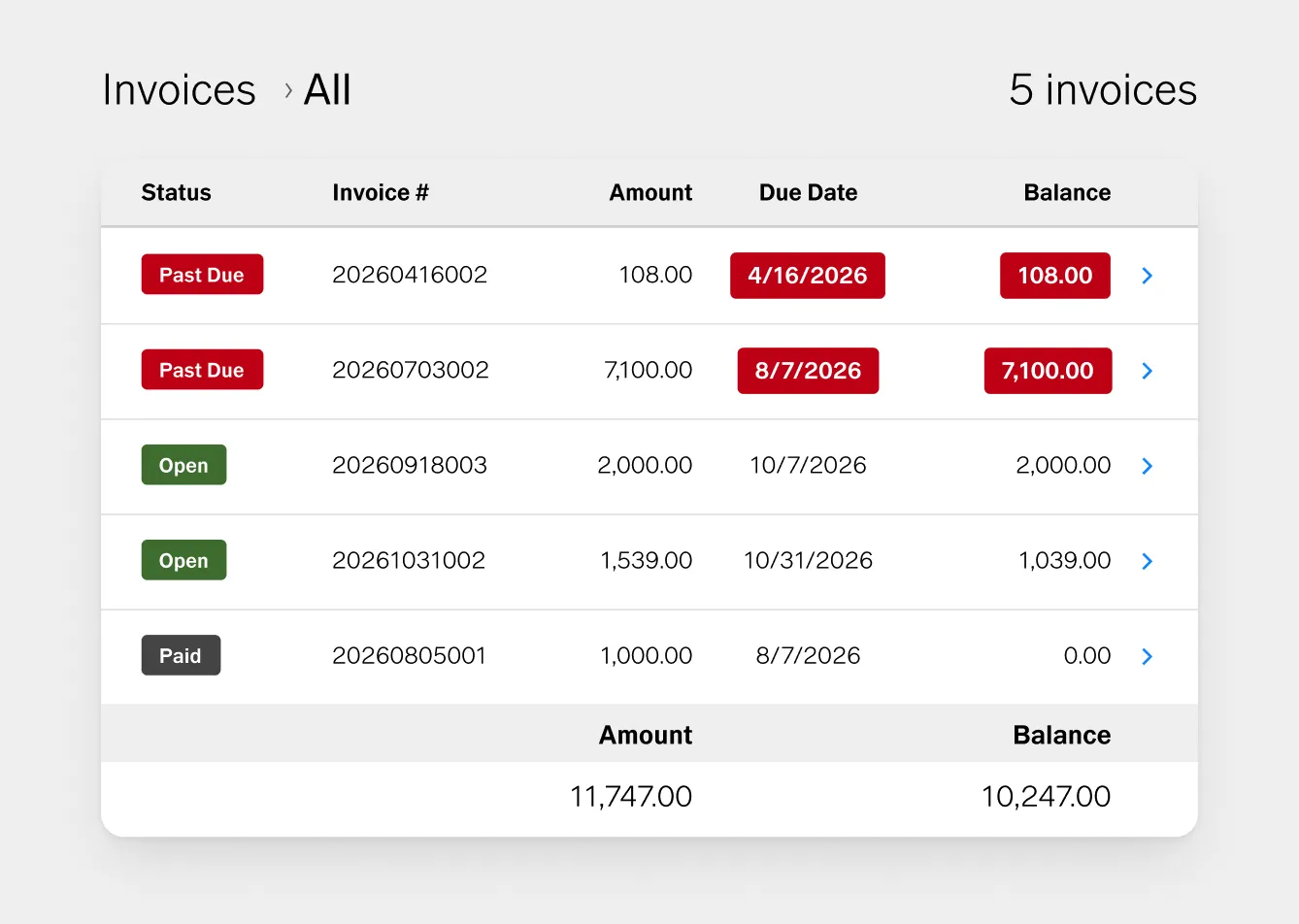
A professional invoicing process for photography needs to do more than produce a document.
It needs to:
Track payment status automatically. You should be able to see at a glance what's been paid, what's outstanding, and what's overdue, without opening individual email threads or checking a spreadsheet you've been maintaining separately.
Send payment reminders without you. A client who misses an invoice due date usually isn't refusing to pay. They're busy. An automated reminder that goes out a few days before and a few days after the due date takes the awkwardness out of following up and can help you get paid faster without any manual intervention.
Handle deposits and installment payments. Photography billing frequently involves split payments: a retainer at booking, a balance before the session, a final payment after delivery. These aren't separate invoices. They're a structured payment schedule tied to a single project. Dedicated invoicing software lets you build that schedule into a single quote rather than managing it across multiple documents.
Accept online payments directly. Sending a PDF and then asking a client to pay through a separate app or bank transfer adds another step to the payment process. Every extra step is an opportunity for a payment to stall. Software that lets clients pay directly from the invoice, by card, ACH, or digital wallet, shortens the distance between an invoice sent and a payment received.
Connect to the rest of the project. An invoice doesn't exist in isolation. It's connected to a client, a contract, a session date, a quote, and a gallery. When all of those live in different tools, you spend time moving information between them. When they're in the same system, everything about a project is in one place.
The direct cost of using Google Docs for invoices is zero. The indirect cost can be the time spent managing invoices manually.
Every invoice you create manually involves finding the right client information, updating the line items, verifying the total, assigning an invoice number you're tracking somewhere else, exporting the file, attaching it to an email, and sending it.
That's not especially difficult for any single invoice. Across a full year of bookings (retainers, balance payments, add-ons, and the occasional payment plan), it adds up.
The follow-up cost is where it really accumulates. Tracking which clients have paid, which haven't, and when to send a reminder without damaging a relationship requires consistent attention.
Automating that removes both the time cost and the social friction of asking for money.
There's also a less visible cost: the way your billing process shapes how professional you appear to clients.
A client who receives a quote, signs a contract, and pays a deposit in one clean flow has a different experience than one who receives those documents and payment requests separately.
Clients book you for your photography, but they remember, and mention to their friends, how easy or difficult you were to work with.
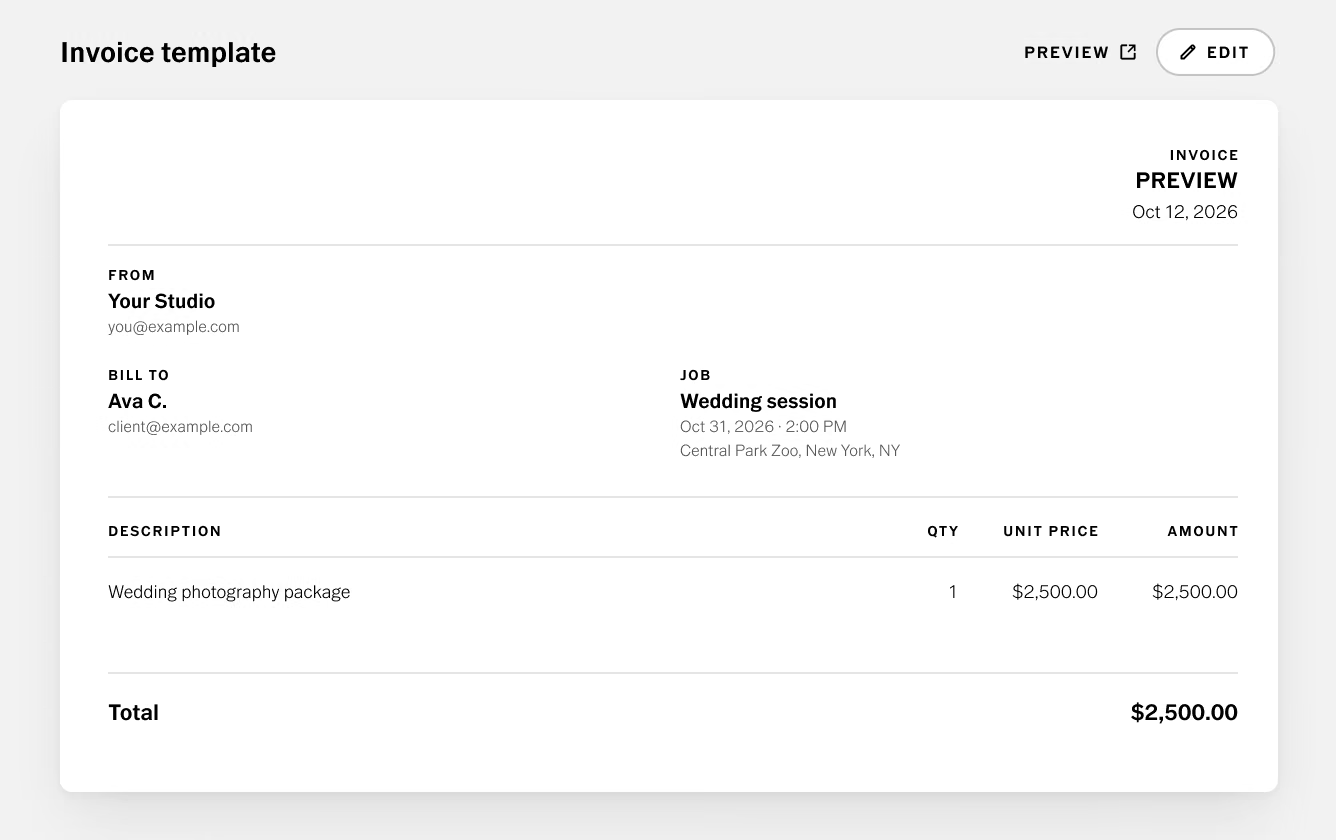
The right invoicing software for photography doesn't need to be the most feature-rich option available. It needs to fit how your business actually works.
When evaluating invoicing tools, look for:
- Reusable invoice and quote templates that reflect your brand and save you from rebuilding the same document every time
- Invoice numbering and payment tracking so you can see your full billing picture without maintaining a separate spreadsheet
- Automated payment reminders that go out on a schedule without requiring manual action
- Online payment processing by card, ACH, or digital wallet, so clients can pay from the invoice itself
- Payment schedules that let you structure deposits and installments within a single project rather than managing them as separate billing events
- Connection to client and project records so the invoice is linked to the contract, the session details, and the client history, not floating in isolation
- Integration with the rest of your workflow, or a system that handles the full client lifecycle, so information doesn't have to be copied between tools
The right level of complexity depends on your volume. A photographer doing a handful of portrait sessions a month has different needs from one managing multi-stage commercial projects with recurring clients.
Start with what your current volume requires and scale from there.
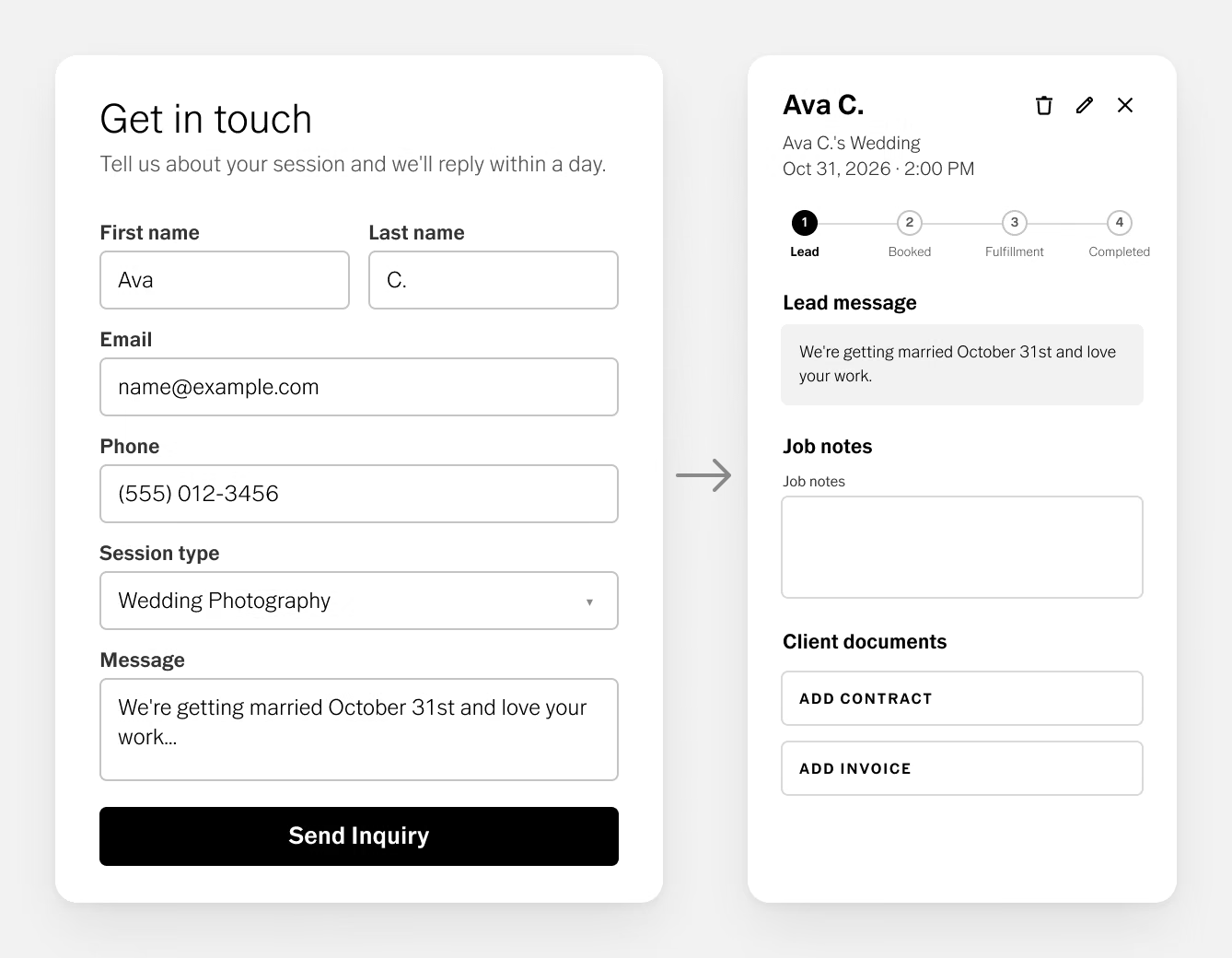
One of the clearest advantages of dedicated studio software over standalone documents is what becomes possible when billing connects to everything else.
When a potential client submits an inquiry through your website, their information flows into your CRM.
When you send a quote, it includes the contract, the package details, and the payment schedule in a single link. The client reviews, signs, and pays the deposit without switching between systems.
When the project is delivered, the gallery link goes out from the same system that holds the contract and the invoice.
Every touchpoint in the client relationship lives in one place.
VSCO Workspace is built around this workflow. Quotes include the contract and payment schedule so booking and billing happen together, and invoices stay connected to the client's job record alongside their contact details, communication history, and project notes. Automated reminders handle follow-up, and clients pay directly through Stripe or Square. When the work is ready, VSCO Galleries delivers it through a clean, private gallery linked back to that same job record.
VSCO Sites contributes to the beginning of this workflow: a portfolio website with a built-in contact form that sends new inquiries directly into Workspace as managed leads. A visitor who finds your portfolio and a client who has already signed a contract and paid a deposit can move through that same connected system, rather than a chain of disconnected tools.
Not every photographer needs dedicated billing software immediately. But these are reliable signals that your current process is costing more time than it should:
- You're creating invoices regularly enough that the manual work feels repetitive
- You frequently have multiple unpaid invoices and can't immediately recall the status of each one
- You're manually tracking due dates and writing follow-up emails yourself
- Your projects involve deposits, installments, or multi-stage billing
- You're copying the same client information into multiple documents for the same project
- You've ever sent an invoice and then wondered whether you'd already sent it
If several of these apply, the friction in your current process is real. Moving to dedicated invoicing software earlier rather than later also makes scaling easier. It's significantly simpler to adopt a system when your client volume is moderate than to rebuild your billing process mid-busy-season.
Moving away from Google Docs doesn't require rebuilding your business over weeks of a transition.
Start by mapping your current process: how you invoice, how you track payments, how you handle follow-up. The steps that take the most time or create the most friction are the first things worth automating.
Choose a system built around those points, ideally one that moves your existing invoices, contracts, and contacts for you rather than asking you to recreate them. VSCO Workspace does this free when you switch to VSCO One, so cost isn't a reason to keep pushing it off. VSCO One also includes a 30-day cancellation window with a full refund, so you can see how it handles real work before you commit (downloading any VSCO Film preset ends that window). Book a call to learn more.
Get comfortable with payment tracking and reminders before you rely on them. Then look for the connections. When your portfolio, contact form, contracts, invoices, and client galleries live in one system, or in systems that talk to each other, you stop moving information by hand. That's when the overhead drops and your attention goes back to your business and photography.
Is Google Docs good enough for photography invoices?
The document itself is fine. Google Docs doesn't include built-in features for tracking invoice payments, sending automated payment reminders, managing payment schedules, or linking invoices to contracts and client records. As your client volume grows, managing all of that by hand becomes the bottleneck.
When should a photographer switch to invoicing software?
When you're regularly creating invoices, managing multiple unpaid balances, or sending payment reminders manually. The earlier you build the system, the easier the switch. Doing it mid-busy-season is harder than setting it up during a slower stretch.
Does dedicated invoicing software integrate with the rest of a photography workflow?
The best options do. VSCO Workspace keeps invoices linked to the client's contract, communication history, and project record. Automated reminders can handle follow-up, and gallery delivery ties back to that same record once the work is done.
What payment methods should photography invoicing software support?
At minimum, credit and debit cards. ACH bank transfer is worth offering too, since it typically costs less to process on larger invoices. VSCO Workspace connects to Stripe or Square, both of which support card, ACH, and digital wallet payments.
How do I handle deposits and installment payments?
Dedicated software lets you build a payment schedule into a single quote: specify the retainer amount, when it's due, and when the balance is due. Clients see the full structure upfront and pay each installment from the same link, so you're tracking one project instead of several separate invoices.
The Invoice Is the Easy Part
Creating the document was always the easy part. Tracking whether it was received, following up when it wasn't, and connecting it to everything that happened before and after is where manual processes create drag on a business that's trying to grow.
Dedicated invoicing software builds on the document with payment tracking, automated reminders, and connections to the rest of the project.