
Clients remember how a photography session felt as much as how the images look.
A prompt reply, a clear plan, and a polished gallery build trust, and they make clients more likely to rebook and refer friends.
This guide walks through each stage of the photography client journey, with practical steps, sample wording, and ways to simplify the work with VSCO.
Key answers
Creating a better photography client experience starts with clear communication, thoughtful preparation, a comfortable photoshoot, and professional image delivery. A consistent workflow helps build trust, improve client satisfaction, and encourage repeat bookings and referrals.
- Simplify inquiries and booking: Respond promptly, communicate pricing and availability, and make contracts, invoices, and scheduling easy to complete.
- Prepare clients before the session: Use a photography client questionnaire to understand their goals, preferences, expectations, and logistical needs.
- Create a comfortable photoshoot experience: Provide clear direction, encourage collaboration, and adapt to client feedback or unexpected changes.
- Deliver photos professionally: Use organized online galleries with simple viewing, downloading, and sharing options.
- Follow up after delivery: Check in with clients, request feedback, and maintain relationships that encourage repeat bookings and referrals.
- Streamline your workflow: Use tools like VSCO Workspace, Sites, and Galleries to manage inquiries, client communication, and photo delivery in one connected process.
What you'll learn in this guide:
- Map Out Your Photography Client Journey
- Make Inquiry and Booking Feel Effortless
- Prepare Clients for a Successful Session
- Create a Comfortable, Collaborative Session
- Deliver Finished Images With Care
- Follow Up and Build Lasting Client Relationships
- FAQ
Mapping the client journey shows you where clients wait, wonder, or get confused.
Most photography client journeys have four stages:
- Inquiry and booking: Respond promptly, explain your services, and make booking straightforward.
- Pre-session preparation: Gather client preferences, confirm logistics, and set shared expectations.
- The photography session: Give clear direction, adapt to the client, and keep the environment comfortable.
- Delivery and follow-up: Present finished images professionally, make downloads simple, and stay in touch afterward.
Within each stage, identify the key touchpoints, such as your first reply, contract signing, preparation email, session day, and gallery delivery.
For each one, decide what the client needs and how you'll provide it.
A quick way to start is to list every message and handoff from your last project, then mark the ones that took the most effort or prompted the most questions.
A prospective client might find your work through a referral, social media, or your website, and their first interaction with you can shape whether they book.
When someone reaches out, reply promptly with what they need to take the next step.
A helpful first reply includes:
- Your availability
- Starting prices
- A link to relevant portfolio work
- A brief explanation of your booking process
Then make the next step obvious. If you want clients to schedule a consultation, sign a contract, or pay a deposit, tell them exactly what to do, and send the contract and invoice together so they can finish in one sitting.
Choose the Right Communication Channels
Different messages call for different channels:
- Email works well for information clients may need to reference later, such as proposals, contracts, invoices, and preparation guides.
- Text messages are useful for quick reminders, arrival instructions, or last-minute schedule changes.
Whatever channels you use, keep communication organized, and establish expectations around response times, office hours, and turnaround times.
Clients don't need an immediate answer to every question, but they should know when to expect one.
Automate Repetitive Tasks Without Losing the Personal Touch
Templates and automated reminders can handle routine communications, including:
- Booking confirmations
- Payment reminders
- Pre-session check-ins
The key is to make these messages feel relevant to the person receiving them. Use a template as a starting point, then add details specific to the client or their session.
For example, your confirmation email could acknowledge a location they've chosen or reference the visual inspiration they shared.
These small touches show that you're paying attention, even when parts of your workflow are automated.

One of the easiest ways to start working with clients is with a photography client questionnaire. It might cover:
- Session goals: What will the images be used for, and what would make the session successful?
- Visual preferences: Are there particular colors, poses, reference images, or photography styles they like?
- Comfort and accessibility: Do they have concerns about being photographed, mobility needs, or other preferences you'd benefit from knowing?
- Logistics: What locations, timing requirements, parking arrangements, or backup plans should you confirm?
- Delivery expectations: How many edited images should they expect, when will they receive them, and how can they use or share them?
Keep your questionnaire focused. A long form filled with unnecessary questions can make preparation feel like another task on a client's to-do list.
Prioritize the information that will genuinely influence the session.
Turn Client Preferences Into a Clear Plan
Once you've gathered their answers, use them to guide your decisions.
A client who feels awkward posing might appreciate prompts that encourage natural movement instead of a series of static poses.
A family with young children may need a shorter session scheduled around their routine.
A brand preparing for a product launch might need an image list organized around its website, social channels, and marketing materials.
Confirm the practical details before the session, too. Send the location, arrival time, expected duration, and any instructions about clothing or preparation.
If weather or venue access could affect the plan, explain your backup options in advance.
It's also important to agree on image usage and privacy expectations, particularly for commercial work, private events, and sessions involving minors. Clarifying these boundaries early helps everyone understand how the finished images may be shared.
Start each session by explaining what you'll be doing and offering simple, specific direction.
Instead of telling someone to pose naturally, suggest an action, such as walking toward the light, turning slightly toward a friend, or shifting their weight.
For clients who feel uncertain, a quick preview of a few frames can help them relax and understand what's working.
You can also ask for feedback throughout the session to make sure the images are moving in the right direction.
Adapt your approach to the person in front of your camera. Some clients enjoy detailed direction, while others prefer room to move and interact naturally.
For commercial photography, connect your creative decisions to the brand's goals so the final images feel authentic and useful.
Stay Calm When Plans Change
Unexpected challenges are part of photography. Weather shifts, locations become unavailable, and sessions sometimes run behind schedule.
How you respond can make or break the client experience:
- Communicate changes clearly
- Offer practical alternatives
- Explain how any adjustments might affect the session
Professionalism also means respecting clients' boundaries.
Confirm consent and image-sharing permissions, and make sure everyone understands any changes to the original plan.
The way you present your work is part of the experience, too.
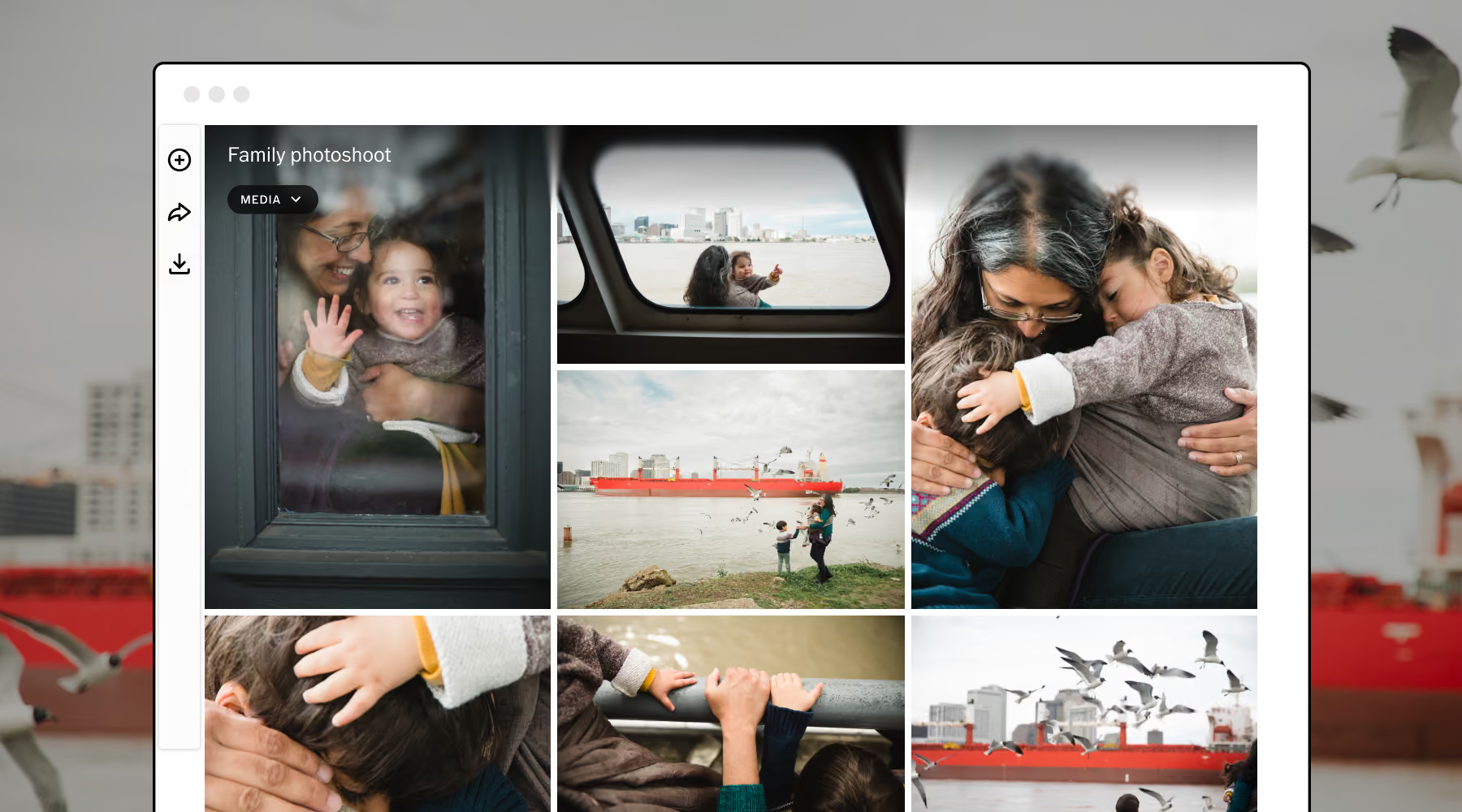
A polished gallery makes your images feel considered and gives clients an enjoyable way to revisit their session.
VSCO Galleries can help photographers present and share client images through dedicated online galleries, creating a more professional delivery experience than sending a folder of files without context.
Curate a Gallery That Tells a Story
A thoughtful selection gives clients a stronger collection of images to enjoy and makes the gallery easier to navigate.
How you organize the images will depend on the session:
- Portraits: Lead with a standout image, then include a mix of expressions, poses, and compositions.
- Weddings and events: Arrange images in a sequence that helps clients relive the day's key moments.
- Brand photography: Group images by purpose, such as website banners, product details, and social media content.
Consistency matters throughout the collection. Review your final edits for color, exposure, and overall style, and check that the images reflect the look and feel you established with your client.
Make Viewing, Downloading, and Sharing Simple
Before delivering the gallery, check that the link works and the images display properly on both desktop and mobile devices.
Make download instructions easy to find, and explain which files are suitable for different uses if you've provided multiple formats or sizes.
Include any relevant usage guidelines, too.
Personal portrait clients may need a reminder about permitted sharing, while commercial clients may need clear information about licensing, usage rights, and additional permissions.
A short delivery email can tie everything together:
- Thank the client
- Explain how to access their gallery
- Outline any relevant download deadlines
- Invite them to reach out with questions
These details make delivery feel like a natural conclusion to the experience.
A few days after delivery, check that the client received their images and can download them successfully. You can even automate this type of communication with a photography CRM.
You can also ask a specific question about their experience, such as which part of the process they enjoyed most or whether anything could have been clearer.
Specific questions tend to generate more useful feedback than a general request to rate your service. Pay attention to recurring comments and use them to improve your workflow.
Here’s a simple follow-up schedule you can use:
- A few days after delivery: Confirm that the gallery works and ask for feedback.
- Two weeks after delivery: Send a thank-you message and invite the client to share their experience or refer someone who might need your services.
- A few months later: Share a relevant resource or check in about how they're using their images.
- Before a likely repeat-booking period: Reach out with a timely suggestion for another session.
Choose touchpoints that make sense for your services, and keep your outreach helpful rather than overly promotional.
Learn more in our guide on How to Automate Client Communication Without Losing the Personal Touch.
What is the photography client experience?
It is everything a client goes through with you, from their first inquiry to gallery delivery and follow-up. Each reply, form, session moment, and message shapes how they remember working with you.
What should I include in a photography client questionnaire?
Cover session goals, visual preferences, comfort and accessibility needs, logistics, and delivery expectations. Keep it short so clients can finish it quickly.
How quickly should I reply to a photography inquiry?
Reply as promptly as you can with availability, starting prices, portfolio work, and your booking process. If you can't respond right away, tell clients when to expect an answer.
How do I deliver photos to clients?
Use an online gallery that works well on desktop and mobile, with clear download instructions and usage guidelines. VSCO Galleries lets you share by link or QR code, and Pro adds password protection.
When should I follow up after delivering a gallery?
Check in a few days after delivery, again about two weeks later, and then a few months out. Add one more message before a likely repeat-booking period.
Build a Photography Workflow That Works for You
A memorable photography client experience comes from a consistent process.
Prompt communication, thoughtful preparation, confident direction, polished delivery, and genuine follow-up all contribute to how clients remember working with you.
You don't need to make every interaction elaborate.
Start by identifying the parts of your workflow that create the most uncertainty or take up the most time, then look for simple ways to improve them.
VSCO tools can help at different points along the way. Use VSCO Sites to showcase your work online, VSCO Workspace to organize your client communication and workflow, and VSCO Galleries to present and deliver finished images.
When your process is clear and organized, you can spend less time managing the details and more time doing what you love: creating photographs your clients are excited to receive, share, and return for.