
Key answers
Photographers can get paid faster by setting clear payment terms before a session, collecting deposits, sending accurate invoices promptly, and automating payment reminders. A consistent invoicing process helps reduce late payments, improve cash flow, and keep client relationships professional.
- Set payment terms upfront: Include deposits, due dates, accepted payment methods, and late-payment policies in your proposal and contract.
- Collect deposits and use milestones: Request payment at booking and schedule remaining payments around project stages.
- Create clear, professional invoices: Include itemized services, invoice numbers, payment deadlines, outstanding balances, and payment instructions.
- Make payments easy: Offer secure online payment options and direct payment links to reduce friction.
- Automate reminders: Send reminders before and after due dates, and track outstanding balances in one place.
- Use photography invoicing software: Tools like VSCO Workspace help manage invoice templates, payment schedules, automatic reminders, and client billing alongside the rest of your photography workflow.
This guide shows you how to invoice as a photographer, step by step, with checklists and sample wording you can adapt.
What you'll learn in this guide:
- Set Clear Payment Terms Before the Session
- Collect a Deposit and Bill in Milestones
- Create Invoices That Are Easy to Understand
- Make Paying as Easy as Possible
- Automate Reminders and Track Balances
- Follow Up on Late Payments Professionally
- FAQ
When clients understand your pricing, deliverables, and payment schedule from the start, there is little room for confusion when payment comes due.
Put these details in your photography proposal and your contract:
- Services and deliverables: Session length, the number of edited images, retouching, prints, and any additional services
- Total cost: An itemized list of fees, including travel, equipment rentals, licensing, and rush delivery when they apply
- Payment schedule: When deposits, installments, and final payments are due
- Accepted payment methods: How clients can pay and whether processing fees apply
- Late-payment policy: Any late fees, deadlines, or consequences for overdue balances
Keep these terms identical across your proposal, contract, and invoices.
If your contract promises 30-day payment terms, an invoice that demands payment in seven days creates exactly the confusion you were trying to avoid.
To simplify the process, a photography CRM like VSCO Workspace can help you create professional quotes, proposals, and contracts using reusable templates, while keeping your client details, bookings, and payments organized in one place.
Waiting until a project is finished to collect payment puts pressure on your cash flow, especially when you're covering travel, equipment rentals, or assistant fees up front.
Tie payments to the stages of the project instead:
- When the client books: Invoice the agreed deposit or retainer to reserve the date.
- After the session: Invoice any payment due at that stage, ideally the same day or the next business day.
- During a longer project: Bill at each agreed checkpoint, such as an initial round of deliverables.
- Before final delivery: Give the client enough notice to pay the remaining balance.
The right schedule depends on the job.
- A smaller session may need only a booking payment and a final payment.
- A larger assignment benefits from installments, which cover your expenses as they arise instead of leaving you to finance the whole project.
Some photographers collect the full session fee in advance, and others invoice commercial clients after the work is complete.
Whatever you choose, build it into your proposal and contract, then stick to it.
Label every invoice so the client knows whether they're paying a deposit, a progress payment, or the final balance.
Be specific about whether an upfront payment is a deposit or a retainer, whether it's refundable, and what happens if either side cancels.
Your contract should spell out those conditions, because the label alone doesn't settle them.
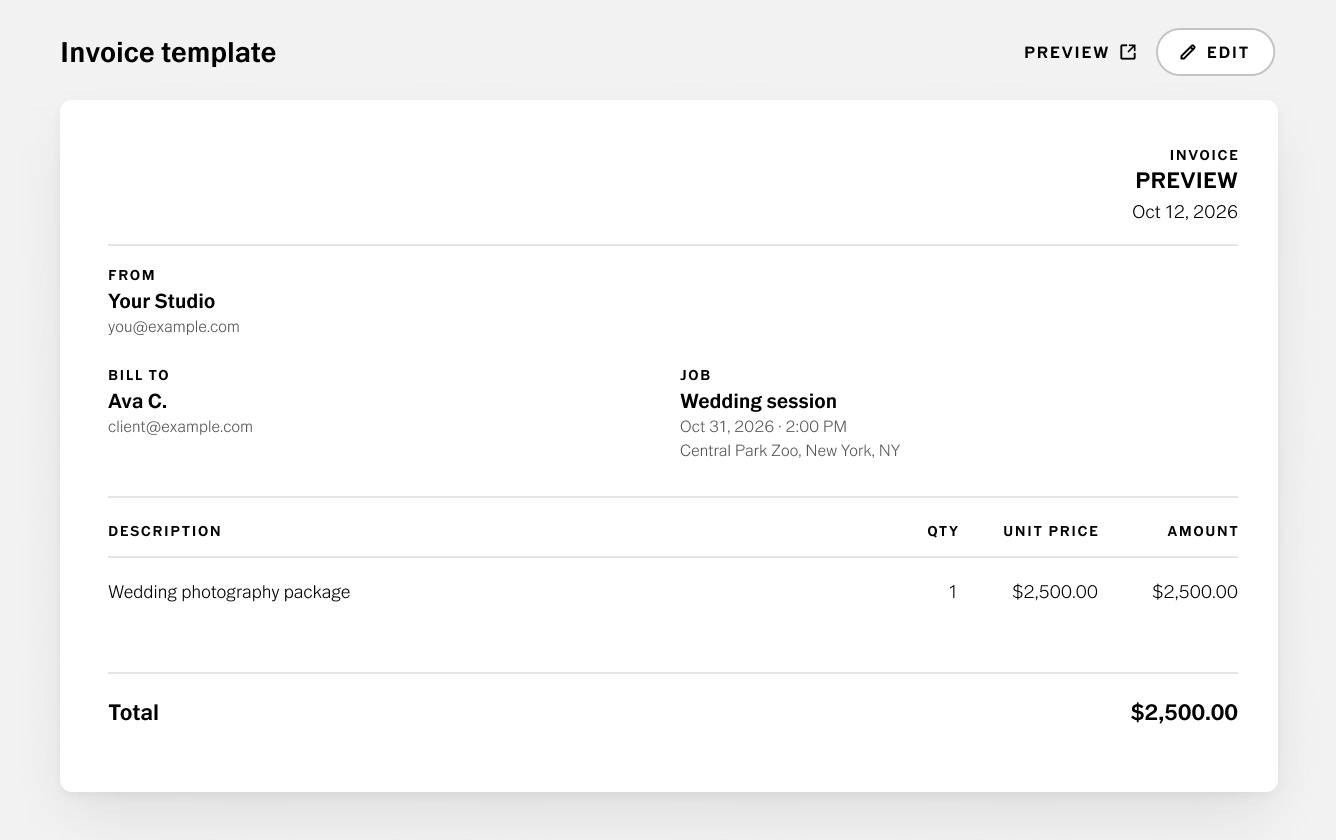
When the services, total, and due date are easy to find, approving payment takes a client less effort.
Check that every photography invoice includes:
- Your business name and contact information
- The client's name and billing details
- A unique invoice number
- The issue date and the service date
- An itemized list of services and costs
- Any applicable taxes, discounts, or previous payments
- The total outstanding balance
- The payment deadline and accepted payment methods
- Instructions or a link for submitting payment
Add the project date and location, the number of images the agreement covers, any additional editing fees, and relevant licensing or usage terms.
A reusable photography invoice template keeps the format consistent and makes each invoice faster to prepare. Include your branding, standard service descriptions, payment instructions, and business information.
Then customize the project details and double-check the totals before you send it.
Not sure whether to create invoices manually or use dedicated software? Read our guide to Google Docs vs. invoicing software to compare your options and find the best fit for your photography business.
Using a photography invoicing software
In VSCO Workspace, you can save invoices as reusable templates and set up deposits, installments, or a custom payment schedule for each job.
Workspace separates the deposit from the remaining balance and shows what has been paid and what is left.
A quote can convert into a ready-to-pay invoice when a client accepts it. Invoices are available with the free version of Workspace, and full Workspace comes with VSCO One.
A late payment often comes down to an inconvenient or unclear process.
A missing payment link, confusing instructions, or a payment method the client doesn't use can all cause delays.
Remove those obstacles wherever you can.
Choose payment options that make sense for your business and your clients, such as credit or debit cards, bank transfers, and other secure electronic payments.
As you decide, consider:
- Convenience: Can clients pay from a phone or computer without extra steps?
- Processing fees: Are the costs manageable, and have you explained any fees clients may be charged?
- Security: Are payments processed through a reputable provider?
- International payments: If you work with clients abroad, can you accommodate their currencies and payment requirements?
Include a direct payment link whenever your invoicing system supports it.
The fewer steps between opening the invoice and paying it, the sooner it gets settled.
Workspace connects to Stripe and Square, so clients can pay by credit card or ACH through a secure link on any device.
ACH is available for US businesses, and clients can add a tip online. Standard processing fees from Stripe or Square apply.
Keep the invoice itself clean. It doesn't need elaborate design to reflect your brand. A clear layout, consistent typography, and recognizable business details are enough.
Make the amount due, the deadline, and the payment instructions the easiest things to spot, and add a short, friendly note:
“Thanks for trusting me with your project! Your invoice is attached, and you can use the payment link below to settle the balance by the due date. Please reach out if you have any questions.”
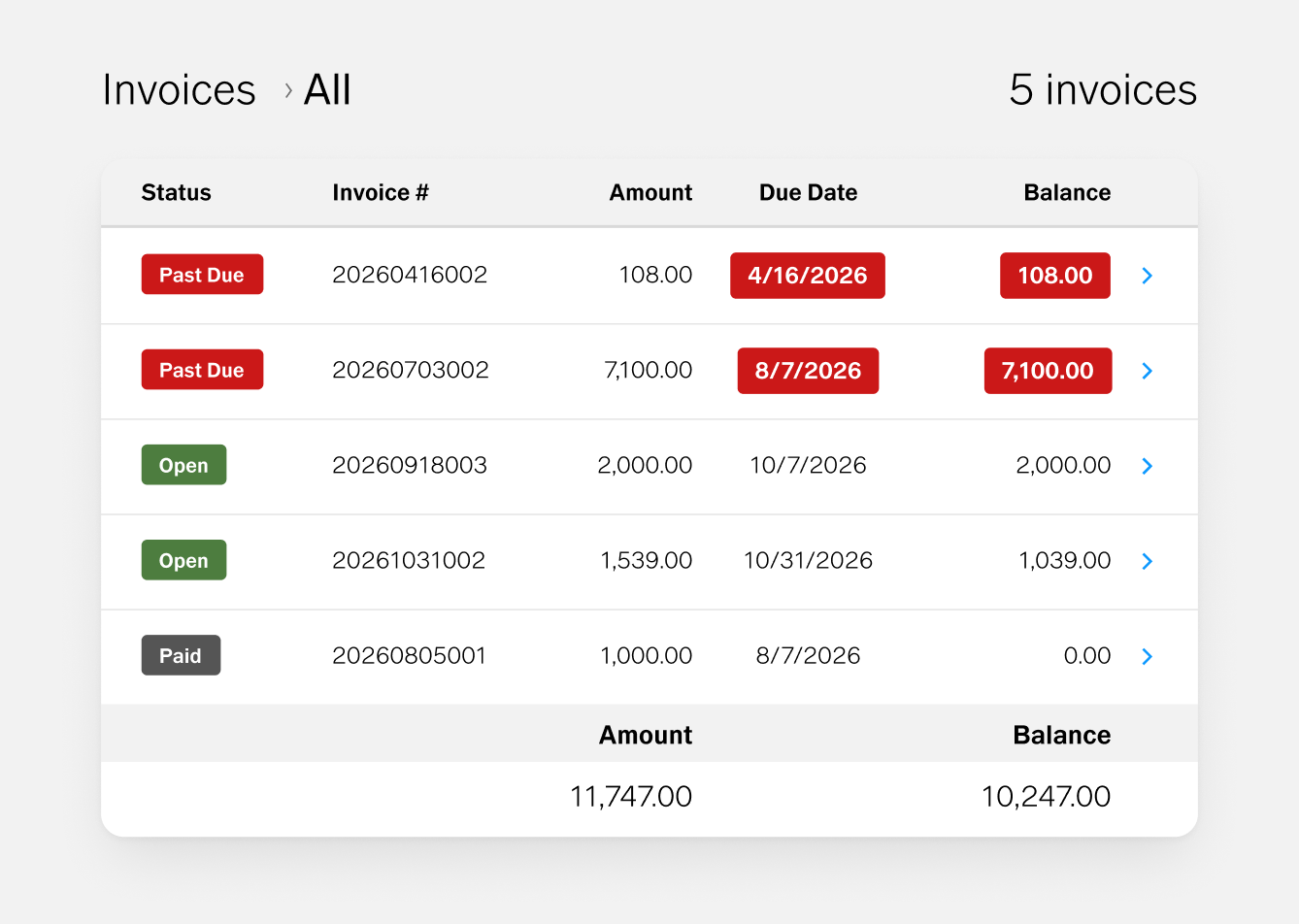
Use an invoicing tool that lets you schedule reminders, monitor outstanding balances, and keep payment records in one place.
A simple reminder schedule looks like this:
- Before the due date: Send a friendly reminder a few days ahead.
- On the due date: Let the client know payment is due.
- After the due date: Follow up with the outstanding amount and a payment link.
- If payment is still outstanding: Contact the client directly to clarify the situation and agree on next steps.
Adjust the timing to fit your payment terms and your relationship with the client. Automated messages should feel helpful, not excessive.
Workspace sends automatic reminders before and after due dates, and you can edit amounts, update due dates, and track outstanding balances from one dashboard, without searching your inbox.
Even with a solid invoicing system, some clients will miss a deadline.
A courteous, consistent follow-up process lets you resolve it without damaging the relationship.
Start by confirming that the invoice was delivered, the payment details are correct, and the balance hasn't already been paid.
Then send a brief reminder with the invoice number, original due date, outstanding amount, and payment link.
For example:
Hi [Client Name],
I'm following up on invoice [number] for [project], which was due on [date]. The outstanding balance is [amount]. You can complete payment using the link below.
Please let me know if you have any questions or need me to resend the invoice. Thanks!
Keep your tone friendly and direct. A missed payment is often an oversight, and an easy way to fix it may be all the client needs.
Learn more in our guide on How to Automate Client Communication Without Losing the Personal Touch.
If the invoice stays unpaid, follow up again on a consistent schedule, reference the original agreement, and explain any next steps your contract provides for.
Keep Accurate Records and Protect Your Boundaries
Keep copies of your invoices, contracts, payment confirmations, and client communications.
These records help you track income, prepare for tax season, and resolve billing disputes.
Sales tax rules for photography services and digital products vary by state, so check with your state's department of revenue or an accountant.
Know your options when a client repeatedly misses deadlines. Your contract may specify late fees, a pause on additional work, or conditions for releasing final deliverables.
Apply those terms consistently and in line with local law.
If your contract ties final delivery to final payment, VSCO Galleries with a Pro membership lets you password-protect a gallery or disable downloads, so you can share previews while a balance is outstanding.
Clear documentation and consistent communication protect your business and give clients a fair chance to resolve what they owe.
What should a photography invoice include?
Your business and client details, a unique invoice number, issue and service dates, itemized services and costs, taxes or discounts, the total due, the deadline, and a way to pay. Add the project date, the number of images covered, and any licensing terms.
When should a photographer send an invoice?
Send the deposit invoice when the client books, then invoice each remaining payment as soon as its milestone is reached. For the final balance, invoice before delivery or on the schedule your contract sets.
Is a deposit the same as a retainer?
Not necessarily. Whether the payment is refundable depends on your contract wording, not the label, so put the conditions in writing.
Can photographers charge late fees?
If your contract states them and local law allows. Outline the fee and the deadline in your payment terms, and apply them consistently.
How do I follow up on an unpaid photography invoice?
Check that it was delivered, then send a friendly reminder with the invoice number, due date, amount, and a payment link. If it stays unpaid, follow up on a set schedule and refer to your contract.
Keep Invoicing in the Same Place as the Rest of Your Client Workflow
A good invoicing process is a system: clear expectations at booking, invoices that are simple to pay, and reminders that run on schedule.
It works best when it connects to the rest of your client work.
With VSCO, a VSCO Sites contact form sends each inquiry into VSCO Workspace as a lead.
From there you can send a quote, collect a signed contract and deposit, invoice the balance, and deliver the finished photos in VSCO Galleries.