A traditional wedding highlight film begins with what already happened: the ceremony, the vows, the first dance. The filmmaker sorts through footage and finds the story afterward.
A wedding microfilm starts with a story you decide to tell.
In China, 婚礼微电影 (wedding microfilms) have developed into their own category within the wedding industry. Couples become the leads in short, cinematic films built around planned concepts, locations, wardrobe, and narrative arcs. One recurring format is 三生三世 (Three Lifetimes), which imagines a relationship continuing across different eras or lives. Rather than documenting the wedding day, the couple appears across several distinct chapters, with changes in costume, setting, and cinematography signaling the shift from one lifetime to another.
The structure offers lessons for wedding photographers anywhere: start with the couple's story, build it in chapters, give each chapter its own visual language, and capture with the final edit in mind. For photographers, it can also open a different kind of client deliverable that draws on skills you already use in composition, light, color, and storytelling
What you'll learn in this guide:
- What Is a Wedding Microfilm?
- Step 1: Plan the Story
- Step 2: Build a Wedding Video Shot List
- Step 3: Use Wardrobe, Location, and Light to Define Each Chapter
- Step 4: Capture Video with Intent
- Step 5: Edit the Wedding Microfilm Around Story and Music
- Step 6: Save Slow Motion for the Moments That Earn It
- Step 7: Build a Cinematic Wedding Video Color Grade
- Step 8: Use Texture as Punctuation, Not Wallpaper
- Step 9: Deliver More Than One Version
- How to Offer Wedding Microfilms to Clients
- A wedding microfilm workflow for photographers
- Deliver the Film and Photography With VSCO
- Frequently asked questions
- Start with the story, not the effect
A wedding microfilm is a short, cinematic wedding video built around a planned story rather than documentation of the wedding day as it unfolds.
The photographer or filmmaker develops the concept before production, then uses locations, wardrobe, lighting, camera movement, music, editing, and color to tell the story. Some are elaborate productions with multiple locations and costume changes. Others are much simpler: a 60-to-90-second film built around one location, one couple, and a handful of plannedoments.
The important distinction is that the story comes before everything else.
Wedding microfilm vs. wedding highlight film
A highlight film is observational. You capture real moments from the wedding day and find the narrative in the footage afterward.
A wedding microfilm reverses that process. You decide what the film is about first, then choose the location, wardrobe, compositions, movement, light, and color to serve that idea. The structure has more in common with an editorial production or short film than with conventional wedding coverage.
For a wedding photographer, that can make the format feel familiar. You're already making decisions about composition, posing, location, light, wardrobe, and visual consistency. The biggest shift is learning to think in sequences rather than individual frames.
Before choosing a preset, a lens, or a camera movement, write one sentence describing what happens in the film.
Then divide it into chapters.
You can draw from the three-lifetimes structure, or use a simpler three-act arc:
Meeting → separation or change → reunion
The chapters don't need to represent literal reincarnation or different historical eras. They might represent how the couple met, how their relationship changed, and where they are now. You could also build a film around a single idea: preparing to see each other, returning to a meaningful place, moving through different stages of the relationship.
What matters is visual contrast. Something should tell the viewer the story has moved forward.
A simple 90-second wedding microfilm storyboard
For your first microfilm, try building the story around eight beats:
- An establishing frame introduces the world
- One partner enters the scene
- The other notices them
- A detail, a hand, fabric, a doorway, or a ring creates a visual transition
- A wardrobe or location change reveals the next chapter
- Movement builds as the couple comes together
- The couple meets, embraces, or shares a quiet moment
- A final image reveals the couple in their present-day look
Think visually rather than writing dialogue first. What does the camera need to see for the audience to understand each beat?
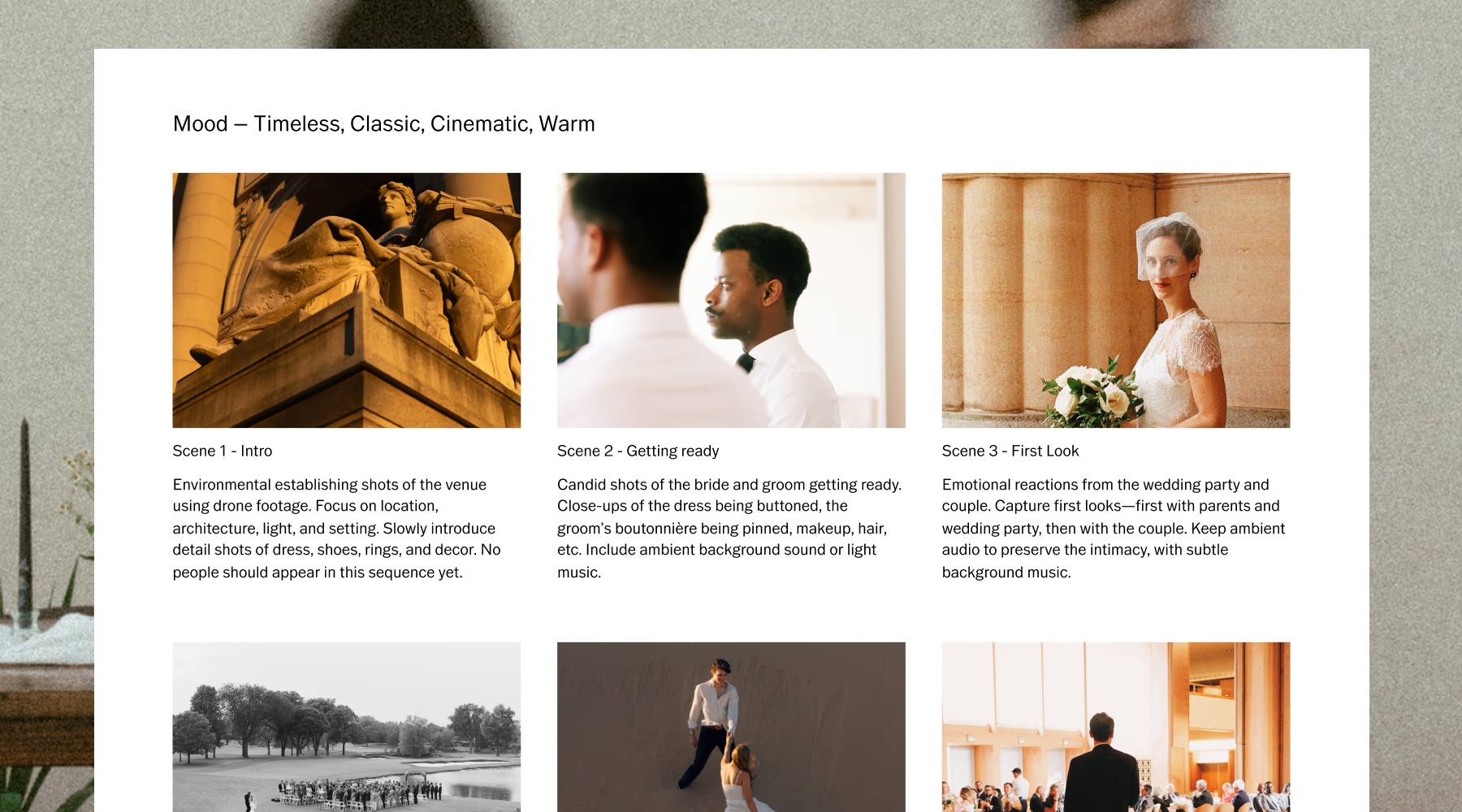
Build a wedding moodboard with VSCO Canvas
Before production, collect the visual references that will define each chapter. A wedding microfilm moodboard might include:
- Wardrobe and styling
- Locations
- Color palette
- Lighting references
- Poses and movement
- Camera framing
- Film references
- Textures and props
- Transition ideas
With VSCO Canvas, you can build the creative direction with the couple in one shared visual space. Create a section for each chapter, then place wardrobe, location, palette, lighting, and framing references together so everyone understands how the story will change visually across sections. This is also the right moment to get alignment with your clients. It's far easier to change a wardrobe reference on a moodboard than to discover after production that you imagined two completely different films.
To get started, try the Video Storyboard template in VSCO Canvas.
Photography trains you to look for the strongest single frame. Video requires one additional question: what comes before and after that frame?
Instead of collecting disconnected beautiful frames, plan sequences that can cut together.
A basic wedding microfilm shot list includes:
Establishing shots
- Venue or location exterior
- Landscape or environment
- Empty room or space
- Architectural details
Story shots
- One partner noticing the other
- Walking toward or away from each other
- Over-the-shoulder glance
- Doorway reveal
- Wardrobe transition
- Hands meeting
- Reunion or embrace
Detail shots
- Rings, hands, flowers
- Fabric, shoes, meaningful objects
- Hair and makeup
- Invitations or letters
Movement shots
- Dress or fabric turning
- Veil catching the wind
- Walking, dancing
- Couple moving toward each other
Closing shots
- Embrace or kiss
- Final portrait
- Couple walking away
- Return to the opening composition
Within each sequence, vary your distance. A pattern of wide, medium, detail, medium, wide gives you more options in the edit and creates visual rhythm.
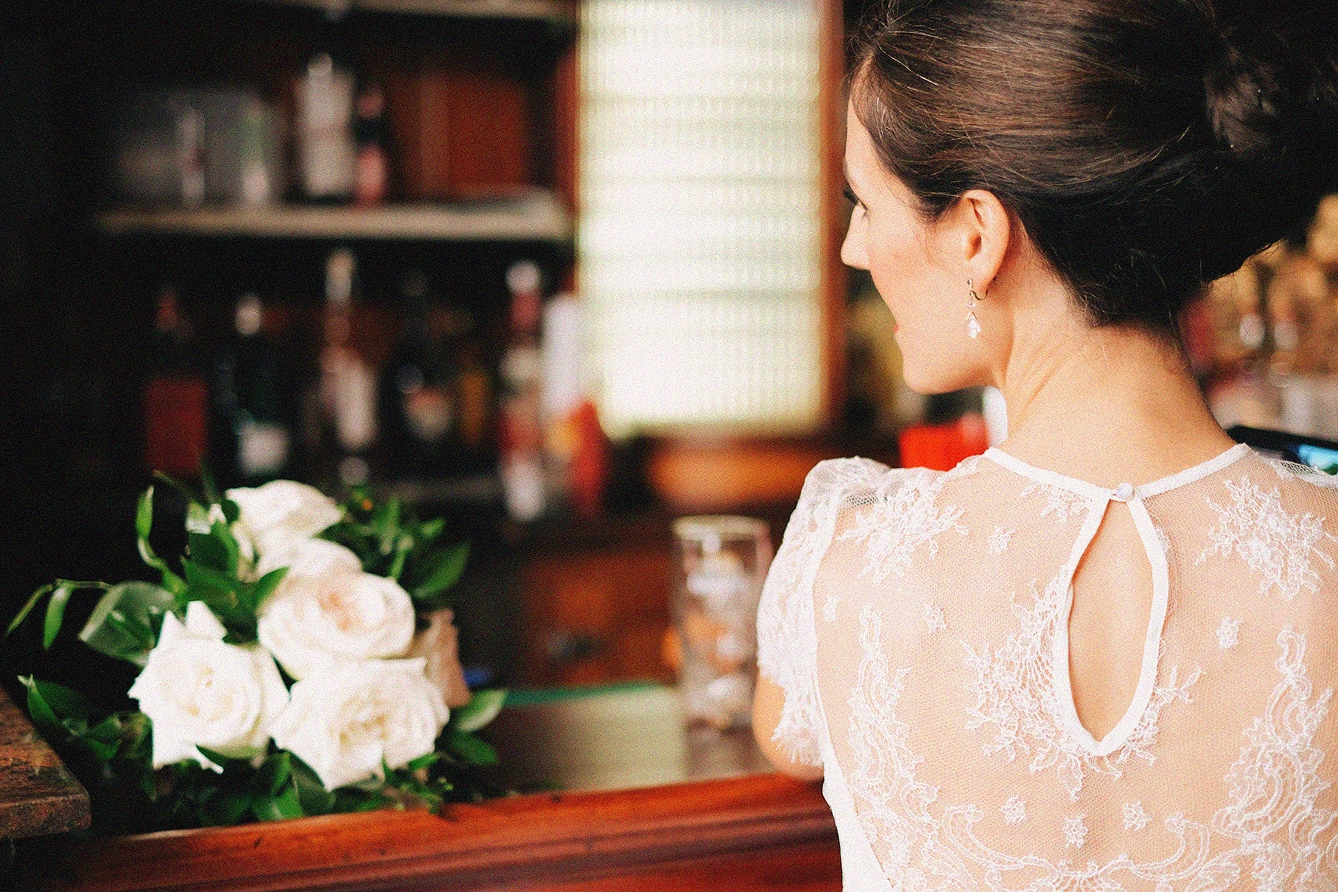
You shouldn't need a title card to explain that the story has moved into a new chapter.
Wardrobe is one of the clearest ways to communicate that transition. Changes in silhouette, material, color, styling, or formality can immediately establish a different moment without any text or narration.
Location can do the same. A field at golden hour, a dim interior, a city street at night, and a clean modern space each create a different emotional world before the couple does anything.
Then use light to reinforce those choices. Prioritize faces. Open shade, window light, and golden hour create soft, flattering transitions across skin. Indoors, look for motivated light from a window, doorway, lamp, or other practical source. Hard light can work beautifully when it's intentional, a silhouette, a dramatic entrance, a visual transition, but shouldn't happen simply because there was nowhere else to put the couple.
A phone is small enough that it's tempting to keep moving it. Resist that.
Before moving the camera, decide why it's moving. Follow the couple because they're walking. Push toward a face because the story is moving toward a realization. Pan because one character is revealing another. If there isn't a reason to move, hold the composition.
The same applies to slow motion, zooms, and transitions. A technique feels cinematic when it supports the story, not when it looks impressive in isolation.
When capturing normal-motion narrative footage, 24fps can be a useful starting point. Leave a second before and after the important action in each clip so you have room to let the edit breathe. Capture more than the obvious moment. If the scene is the couple meeting, film the environment, the approach, their hands, their expressions, and what happens immediately afterward. You're building an editable sequence, not collecting isolated clips.
Capture live video with VSCO Capture
If you're filming on iPhone, VSCO Capture lets you preview how footage will look with a particular treatment while you're still on location, rather than discovering the look in post-production. The free standalone camera app includes 50+ live video presets and captures up to 1080p in HEVC or H.264 at 24fps or 30fps.
For a chapter-based microfilm, test a preset against each wardrobe and lighting setup before recording. That helps you see whether two scenes feel intentionally different, or unintentionally disconnected, while you're still there to adjust.
Note that the manual controls, Grain, Bloom, and Halation effects available in photo mode are specific to still capture. Live presets are what VSCO Capture brings to video. Refine the footage further in the VSCO mobile Video Editor after production.

Don't begin with effects. Start with structure.
Choose properly licensed music early enough that it can inform the edit. Listen for pauses, downbeats, changes in instrumentation, and the start of a chorus. Then decide which story moments deserve those beats. A wardrobe reveal might land on a musical transition. A reunion might happen when the track opens up. A quiet glance might work better during a pause than over the loudest section of the song.
Trim every clip to its essential action and keep asking: does this clip move the story forward? If two beautiful clips communicate exactly the same thing, you probably don't need both.
Edit in the VSCO mobile Video Editor
In the VSCO mobile Video Editor, begin by establishing the structure before adding any visual effects. Trim clips to their essential action, then use VSCO Montage to combine footage and work with transitions, overlays, timing, opacity, and audio volume. Watch the sequence once without color or effects. If the story doesn't work as a simple cut, no effect will fix it.
The Video Editor includes 200+ presets and 40+ video effects across five collections, Texture, Light, Frames, Distressed, and VFX, including dust, grain, glow, light leaks, and 8mm, 16mm, and 35mm film frame options.
Slow motion works because the rest of the film isn't slow.
Save it for moments where extending time adds something:
- A veil catching the wind
- Fabric turning
- Confetti falling
- A first look
- Hands meeting
- Hair or wardrobe movement
- The final steps before an embrace
Using slow motion throughout removes the contrast that makes it feel meaningful. Speed changes and reverse effects are available in the VSCO Video Editor for precisely this kind of selective use.
Use speed controls in the VSCO Slo-Mo Video Editor to slow key moments, apply reverse effects, and adjust the pace of each clip individually.
A cinematic wedding video doesn't need to be dark, desaturated, or covered in film grain.
Start with the fundamentals. Keep skin natural. Preserve detail in bright fabric and faces. Give shadows enough depth without losing important information. Then decide what emotional direction the color should take.
One chapter might feel warm and nostalgic. Another might be cooler and quieter. A final wedding sequence might become brighter and cleaner. The chapters can have different identities while still belonging to the same film.
VSCO's film-inspired presets and editing tools give you a starting point for the grade. Adjust from there based on the actual lighting, wardrobe, skin tones, and environment in each section of footage. Choose the feeling first. Then find the preset that gets you closest to it.
Start the color grade with VSCO's film-inspired presets, calibrated for skin tones, highlights, and the natural palette of real locations. Adjust from there based on the light and wardrobe in each chapter.
Texture effects can separate chapters or reinforce a specific visual idea, but they don't need to cover every second of the film.
VSCO's video effects include grain, glow, light leaks, and film frame options within the Texture, Light, Frames, Distressed, and VFX collections. Used selectively, these work like punctuation: they introduce a chapter, emphasize a memory, or create contrast between sections.
More pronounced effects like VHS, Glitch, or Broken make sense when the story specifically calls for them. The question isn't whether an effect looks interesting. It's whether removing it would make the scene less effective. If the answer is no, consider leaving it out.
Apply 40+ video effects across five collections. Dust, grain, glow, light leaks, and 8mm, 16mm, and 35mm film frame overlays. Available in the VSCO mobile Video Editor.
The couple probably won't watch the film in only one place. Build versions suited to different contexts.
Vertical wedding video for social
A 60-to-90-second vertical version that establishes the premise quickly, moves clearly through the chapters, and finishes on one strong image. The opening should give a viewer a reason to keep watching without any prior context.
Horizontal wedding film
A longer 16:9 version gives establishing frames, glances, and natural audio more room. This works better for private sharing, playing at the reception, or viewing on a larger screen.
You don't need two entirely different films. Build them from the same story and footage, then adjust pacing and framing for each format.
Deliver photography and film as one visual story
Capture companion portraits and details during the same production, then edit the still photography to feel visually connected to the film. Studio Pro can help batch-edit companion photos and establish a consistent look across a large set. Style Match supports developing a related visual direction across still images.
The result can become a complete client deliverable: wedding microfilm, companion portraits, detail photographs, and social-ready selects. Delivering everything through VSCO Galleries keeps the still and video work together in one place, rather than scattering the project across separate platforms.
For photographers, wedding microfilms can be positioned as a creative extension of what you already offer.
You might produce one during:
- An engagement session
- A pre-wedding production
- A bridal or editorial portrait session
- A destination wedding weekend
- A dedicated creative session before the wedding
It can also become an optional add-on to a wedding photography package.
Start with manageable scope. One location, one or two wardrobe changes, eight to ten planned story beats, and a 60-to-90-second finished film are enough to experiment with the format without turning the production into something logistically overwhelming.
Before offering the service, define clearly what's included: session time, locations, revisions, music licensing, aspect ratios, final deliverables, and usage rights. If you're managing the project through VSCO Workspace, those details live alongside the proposal, contract, scheduling, and invoicing in the same client record.
1. Manage the project Establish scope, schedule, deliverables, and client expectations in Workspace.
2. Develop the creative direction Build a shared moodboard in VSCO Canvas with story, wardrobe, location, palette, lighting, and framing references for each chapter.
3. Build the storyboard and shot list Translate the visual direction into sequences you can capture intentionally.
4. Produce the microfilm Capture planned video sequences on your camera or with VSCO Capture on iPhone.
5. Edit around the story Cut to the story and music before adding effects or color.
6. Color and finish Use the VSCO Video Editor to establish the grade, pacing, speed effects, and texture.
7. Edit companion photography Batch-edit still images from the production using Studio Pro to establish visual consistency with the film.
8. Deliver the complete package Present the finished film and photography through VSCO Galleries, where photos and video live together in one delivery.
VSCO Galleries supports both photos and video in a single client delivery. Upload companion photographs and the finished film to the same gallery, share a private link, and clients can access everything on any device without creating an account.
Guest contributions work the same way. Wedding guests, second photographers, and crew can upload their own footage via QR code, no app required, adding perspectives no single camera could capture.
Video storage:
- Free: video counts against the 10GB total storage limit
- VSCO Pro: 65GB dedicated video storage, separate from unlimited photo storage; includes password protection
- VSCO One: same Galleries features as Pro, plus full Workspace for proposals, contracts, invoicing, and client automations
What is a wedding microfilm?
A wedding microfilm is a short, cinematic wedding video built around a planned story. Rather than documenting the wedding day as it happens, it uses a developed concept, locations, wardrobe, cinematography, and music to tell the couple's story in a structured narrative. Films typically run 60–90 seconds, though longer versions are common.
What is the difference between a wedding microfilm and a wedding highlight film?
A highlight film is built from footage captured on the wedding day, with the story found in editing afterward. A wedding microfilm is planned before production begins. The filmmaker develops a concept, storyboard, locations, wardrobe, and shot list around the story they want to tell.
When should you film a wedding microfilm?
A microfilm can be filmed before the wedding as part of an engagement or pre-wedding session, during a dedicated creative session, or across a wedding weekend. Filming before the wedding gives photographers more control over locations, wardrobe, lighting, and timing.
How long should a wedding microfilm be?
A 60-to-90-second film works well as a concise cinematic story or social trailer. A longer horizontal version can provide more room for establishing frames, natural audio, and slower pacing suited to a larger screen.
What shots do you need for a cinematic wedding video?
Start with establishing shots, medium shots of the couple, close-up details, movement, interactions between the couple, and a strong closing shot. Varying between wide, medium, and detail shots gives you enough visual coverage to build sequences during editing.
Can you make a wedding microfilm on an iPhone?
Yes. Story, lighting, composition, camera movement, and editing matter more than the specific device. Plan your sequences carefully, capture multiple distances, and leave enough footage around each action to edit cleanly. VSCO Capture lets you preview a visual treatment with 50+ live presets while filming up to 1080p at 24fps or 30fps.
What frame rate should you use for a wedding film?
24fps can work well for normal-motion narrative footage and is a useful starting point for a cinematic look. Higher frame rates are useful when you intend to slow footage down in post-production, but frame rate alone doesn't make a video feel cinematic.
How do you make a wedding video look cinematic?
Start with a planned story, intentional compositions, controlled camera movement, flattering light, varied focal distances, and a grade that serves the emotional direction of each chapter. Effects like film grain, light leaks, and color grades work best when they reinforce a visual idea rather than substituting for one.
Can photographers add wedding video to their packages?
Photographers can offer short-form wedding video as a separate creative session or an add-on to engagement, pre-wedding, or wedding photography packages. Define the scope before quoting: production time, editing, revisions, music licensing, aspect ratios, and final deliverables.
The appeal of a wedding microfilm isn't a particular preset, frame rate, costume, or transition.
It's the opportunity to tell a couple's story deliberately.
For wedding photographers, that makes the format a natural extension of what you already do: understand people, find light, build compositions, direct movement, develop a consistent visual language, and recognize the moments that carry emotion.
Start small. Build one concept around a couple. Create a moodboard. Plan eight to ten intentional setups. Capture each as a sequence rather than an individual frame. Then turn them into a 60-to-90-second story and deliver it alongside the photographs.
The cinematic look comes afterward. The story is what makes it a film.